> ## Documentation Index
> Fetch the complete documentation index at: https://docs.tilebox.com/llms.txt
> Use this file to discover all available pages before exploring further.
# Working with Geometries
> Best practices for handling geometries in Tilebox, covering winding order conventions and reference systems as well as edge cases like antimeridian crossings.
Geometries are a common cause of friction in geospatial data processing, especially when working with shapes that cross the antimeridian or cover a pole.
Tilebox minimizes this friction, but adhering to the following best practices ensures optimal results. In doing so, you can ensure that no geometry related issues will
arise even when interfacing with other libraries and tools that may not properly support non-linearities in geometries.
## Best Practices
To ensure expected behavior when working with geometries, it's recommended to follow these best practices:
1. Use [language specific geometry libraries](#geometry-libraries-and-common-formats) for creating, parsing and serializing geometries.
2. Define polygon exterior rings with a counter-clockwise [winding order](#winding-order).
3. Define polygon holes (interior rings) with a clockwise [winding order](#winding-order).
4. Ensure longitude values are within `[-180, 180]` and latitude values are within `[-90, 90]`.
5. For geometries crossing the antimeridian, [cut them along the antimeridian](#antimeridian-cutting) into two parts: one for the eastern hemisphere and one for the western.
6. Define geometries covering a pole in [a specific way](#pole-coverings) for correct handling.
7. When downloading geometries from external sources (for example from STAC Catalogs), always verify these assumptions to prevent unexpected behavior before ingesting them into Tilebox.
## Geometry vs Geography
Some systems distinguish between `Geometry` and `Geography` data types. The primary distinction lies in how edge interpolation is handled along the antimeridian. `Geometry` represents a shape in an arbitrary 2D Cartesian coordinate system and does not perform edge interpolation.
In contrast, `Geography` typically wraps around the antimeridian by performing edge interpolation, such as converting Cartesian coordinates to a 3D spherical coordinate system. Typically, Geography types limit `x` coordinates to `[-180, 180]` and `y` coordinates to `[-90, 90]`, whereas `Geometry` types have no such limitations.
Tilebox does not differentiate between `Geometry` and `Geography` types. Instead, it offers a [query option to specify a coordinate reference system](/datasets/query/filter-by-location#coordinate-reference-system). This controls whether geometry intersections and containment checks are performed in a 3D spherical coordinate system (which correctly handles antimeridian crossings) or a standard 2D Cartesian lat/lon coordinate system.
## Terminology
Familiarize yourself with key geometry concepts.
A great resource to learn more about these concepts is this [blog post by Tom MacWright](https://macwright.com/2015/03/23/geojson-second-bite).
**Point**
A `Point` is a specific location on the Earth's surface, represented by a `longitude` and `latitude` coordinate.
**Ring**
A `Ring` is a collection of points that form a closed loop. The order of the points within the ring matter, since that defines the [winding order](#winding-order) of the ring, which is either clockwise or counter-clockwise.
Every ring should be explicitly closed, meaning that the first and last point should be the same.
**Polygon**
A `Polygon` is a collection of rings. The first ring, the `exterior ring` defines the polygon's boundary. Any other rings are called `interior rings`, representing holes within the polygon.
**MultiPolygon**
A `MultiPolygon` is a collection of polygons.
## Geometry libraries and common formats
Geometries can be expressed in different formats. The [Tilebox Client SDKs](/sdks/introduction) delegate geometry handling to external, well-known libraries.
| Client SDK | Geometry library used by Tilebox |
| ---------- | ---------------------------------------------------- |
| Python | [Shapely](https://shapely.readthedocs.io/en/stable/) |
| Go | [Orb](https://github.com/paulmach/orb) |
Here is an example of how to define a `Polygon` geometry, covering the area of the state of Colorado using Tilebox Client SDKs.
```python Python theme={"system"}
from shapely import Polygon
area = Polygon(
((-109.05, 41.00), (-109.045, 37.0), (-102.05, 37.0), (-102.05, 41.00), (-109.05, 41.00)),
)
```
```go Go theme={"system"}
// import "github.com/paulmach/orb"
area := orb.Polygon{
{{-109.05, 41.00}, {-109.045, 37.0}, {-102.05, 37.0}, {-102.05, 41.00}, {-109.05, 41.00}},
}
```
These libraries also enable Tilebox to support common geometry formats.
### GeoJSON
[GeoJSON](https://datatracker.ietf.org/doc/html/rfc7946) is a geospatial data interchange format based on JavaScript Object Notation (JSON).
```json colorado.geojson theme={"system"}
{
"type": "Polygon",
"coordinates": [
[
[-109.05, 41.0],
[-109.045, 37.0],
[-102.05, 37.0],
[-102.05, 41.0],
[-109.05, 41.0]
]
]
}
```
Reading such a GeoJSON geometry can be achieved as follows.
```python Python theme={"system"}
from shapely import from_geojson
with open("colorado.geojson", "r") as f:
area = from_geojson(f.read())
```
```go Go theme={"system"}
import (
"github.com/paulmach/orb/geojson"
"os"
)
func readGeoJSON() (orb.Geometry, error) {
geometryData, err := os.ReadFile("colorado.geojson")
if err != nil {
return nil, err
}
geojsonGeometry, err := geojson.UnmarshalGeometry(geometryData)
if err != nil {
return nil, err
}
return geojsonGeometry.Geometry(), nil
}
```
### Well-Known Text (WKT)
[Well-Known Text (WKT)](https://en.wikipedia.org/wiki/Well-known_text_representation_of_geometry) is a text markup language for representing vector geometry objects.
```python Python theme={"system"}
from shapely import from_wkt
wkt = "POLYGON ((-109.05 41, -109.045 37, -102.05 37, -102.05 41, -109.05 41))"
area = from_wkt(wkt)
```
```go Go theme={"system"}
import (
"github.com/paulmach/orb/encoding/wkt"
)
func readWKT() (orb.Geometry, error) {
wktGeometry := "POLYGON ((-109.05 41, -109.045 37, -102.05 37, -102.05 41, -109.05 41))"
return wkt.Unmarshal(wktGeometry)
}
```
### Well-Known Binary (WKB)
[Well-Known Binary (WKB)](https://en.wikipedia.org/wiki/Well-known_text_representation_of_geometry#Well-known_binary) is a binary representation of vector geometry objects, a binary equivalent to WKT.
Given a `colorado.wkb` file containing a binary encoding of the Colorado polygon, it can be read as follows.
```python Python theme={"system"}
from shapely import from_wkb
with open("colorado.wkb", "rb") as f:
area = from_wkb(f.read())
```
```go Go theme={"system"}
import (
"github.com/paulmach/orb/encoding/wkb"
"os"
)
func readWKB() (orb.Geometry, error) {
binaryData, err := os.ReadFile("colorado.wkb")
if err != nil {
return nil, err
}
return wkb.Unmarshal(binaryData)
}
```
There is also an extended well known binary format (ewkb) that supports additional information such as specifying a spatial reference system (like EPSG:4326) in the encoded geometry.
Pythons `shapely` library supports this out of the box, and the `orb` library for Go supports it as well via the `github.com/paulmach/orb/encoding/ewkb` package.
## Winding Order
A ring's winding order defines its orientation (clockwise or counter-clockwise), determined by the sequence of its points.
Geometries in Tilebox follow the right hand rule defined by the [GeoJSON specification](https://datatracker.ietf.org/doc/html/rfc7946#section-3.1.6):
> A linear ring MUST follow the right-hand rule with respect to the area it bounds, i.e., exterior rings are counterclockwise, and holes are clockwise.
Thus, polygon exterior rings must have a counter-clockwise winding order, and interior rings must have a clockwise winding order. Failing to follow this rule can lead to unexpected query results, as shown below.
Take the following `Polygon` consisting of the same exterior ring but in different winding orders.
```plaintext Counter-clockwise theme={"system"}
POLYGON (
(-5 56, -6 29, 14 28, 23 55, -5 56)
)
```
```plaintext Clockwise theme={"system"}
POLYGON (
(-5 56, 23 55, 14 28, -6 29, -5 56)
)
```
This is how those two geometries would be interpreted on a sphere.
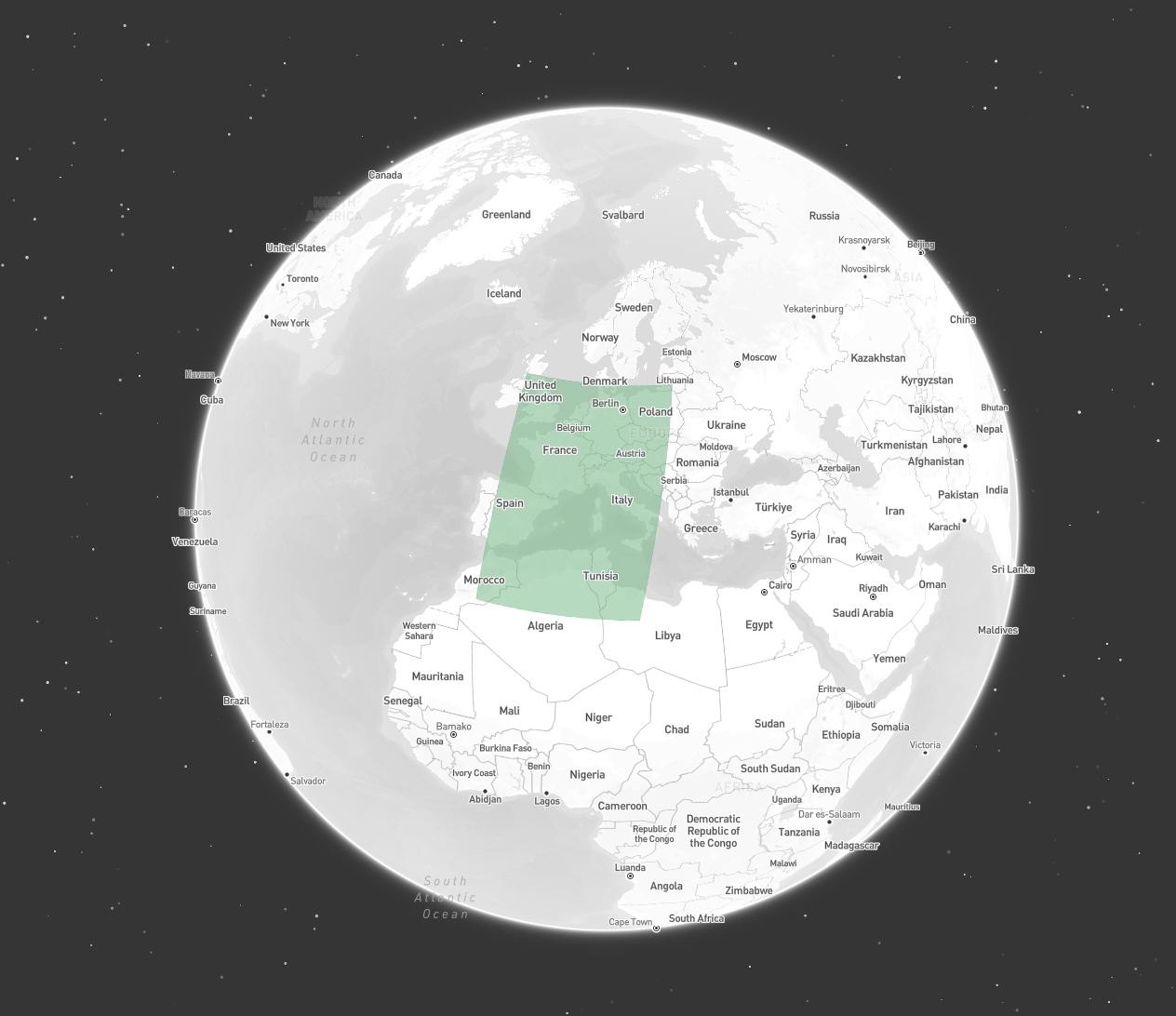
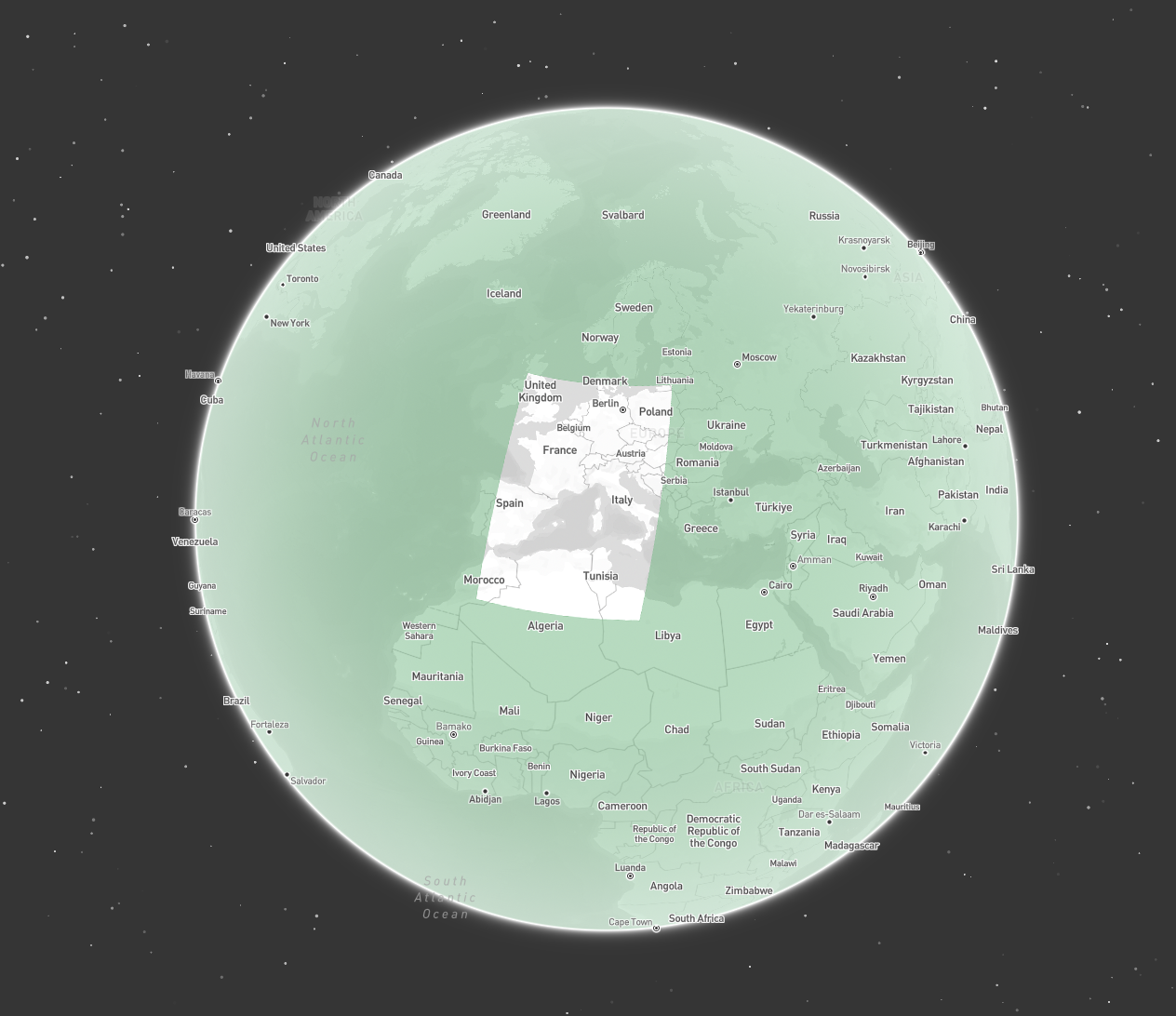 Tilebox automatically detects and corrects incorrect winding orders during data ingestion.
Since such unexpected behavior can cause issues and be hard to debug, Tilebox detects incorrect winding orders and automatically fixes them during ingestion.
This means that geometries covering nearly the entire globe except for a small holes **cannot** be ingested into Tilebox by simply specifying them as a `Polygon` with an exterior ring in clockwise winding order.
Instead, such geometries should be defined as a `Polygon` consisting of two rings:
* an exterior ring covering the whole globe in counter-clockwise winding order
* an interior ring specifying the hole in clockwise winding order
Such a definition, as shown below, ensures correct interpretation by Tilebox, and is also valid according to the [GeoJSON specification](https://datatracker.ietf.org/doc/html/rfc7946#section-3.1.6).
```plaintext Polygon covering the whole globe with a hole over Europe theme={"system"}
POLYGON (
(-180 90, -180 -90, 180 -90, 180 90, -180 90),
(-5 56, 23 55, 14 28, -6 29, -5 56)
)
```
To verify the winding order of a geometry, you can use the following code snippets.
```python Python theme={"system"}
from shapely import Polygon
polygon = Polygon(
((-109.05, 41.00), (-109.045, 37.0), (-102.05, 37.0), (-102.05, 41.00), (-109.05, 41.00)),
)
print(polygon.exterior.is_ccw) # True
```
```go Go theme={"system"}
import (
"github.com/paulmach/orb"
)
func isCounterClockwise() bool {
poly := orb.Polygon{
{{-109.05, 41.00}, {-109.045, 37.0}, {-102.05, 37.0}, {-102.05, 41.00}, {-109.05, 41.00}},
}
exterior := poly[0]
if exterior.Orientation() == orb.CCW {
return true
}
return false
}
```
## Antimeridian Crossings
Geometries that cross the antimeridian are a common in satellite data, but can cause issues when not handled correctly.
Take the following `Polygon` that crosses the antimeridian.
Tilebox automatically detects and corrects incorrect winding orders during data ingestion.
Since such unexpected behavior can cause issues and be hard to debug, Tilebox detects incorrect winding orders and automatically fixes them during ingestion.
This means that geometries covering nearly the entire globe except for a small holes **cannot** be ingested into Tilebox by simply specifying them as a `Polygon` with an exterior ring in clockwise winding order.
Instead, such geometries should be defined as a `Polygon` consisting of two rings:
* an exterior ring covering the whole globe in counter-clockwise winding order
* an interior ring specifying the hole in clockwise winding order
Such a definition, as shown below, ensures correct interpretation by Tilebox, and is also valid according to the [GeoJSON specification](https://datatracker.ietf.org/doc/html/rfc7946#section-3.1.6).
```plaintext Polygon covering the whole globe with a hole over Europe theme={"system"}
POLYGON (
(-180 90, -180 -90, 180 -90, 180 90, -180 90),
(-5 56, 23 55, 14 28, -6 29, -5 56)
)
```
To verify the winding order of a geometry, you can use the following code snippets.
```python Python theme={"system"}
from shapely import Polygon
polygon = Polygon(
((-109.05, 41.00), (-109.045, 37.0), (-102.05, 37.0), (-102.05, 41.00), (-109.05, 41.00)),
)
print(polygon.exterior.is_ccw) # True
```
```go Go theme={"system"}
import (
"github.com/paulmach/orb"
)
func isCounterClockwise() bool {
poly := orb.Polygon{
{{-109.05, 41.00}, {-109.045, 37.0}, {-102.05, 37.0}, {-102.05, 41.00}, {-109.05, 41.00}},
}
exterior := poly[0]
if exterior.Orientation() == orb.CCW {
return true
}
return false
}
```
## Antimeridian Crossings
Geometries that cross the antimeridian are a common in satellite data, but can cause issues when not handled correctly.
Take the following `Polygon` that crosses the antimeridian.
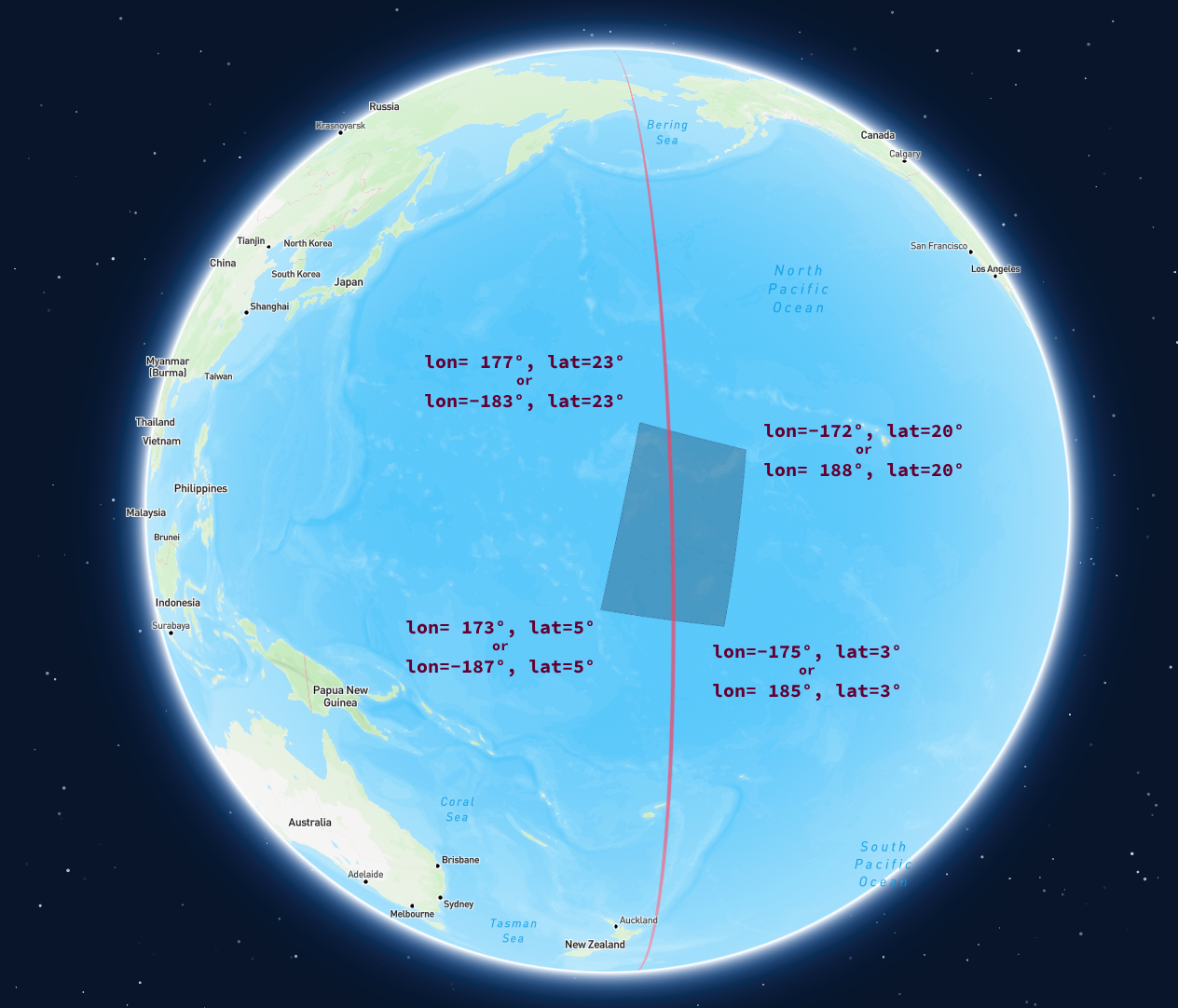
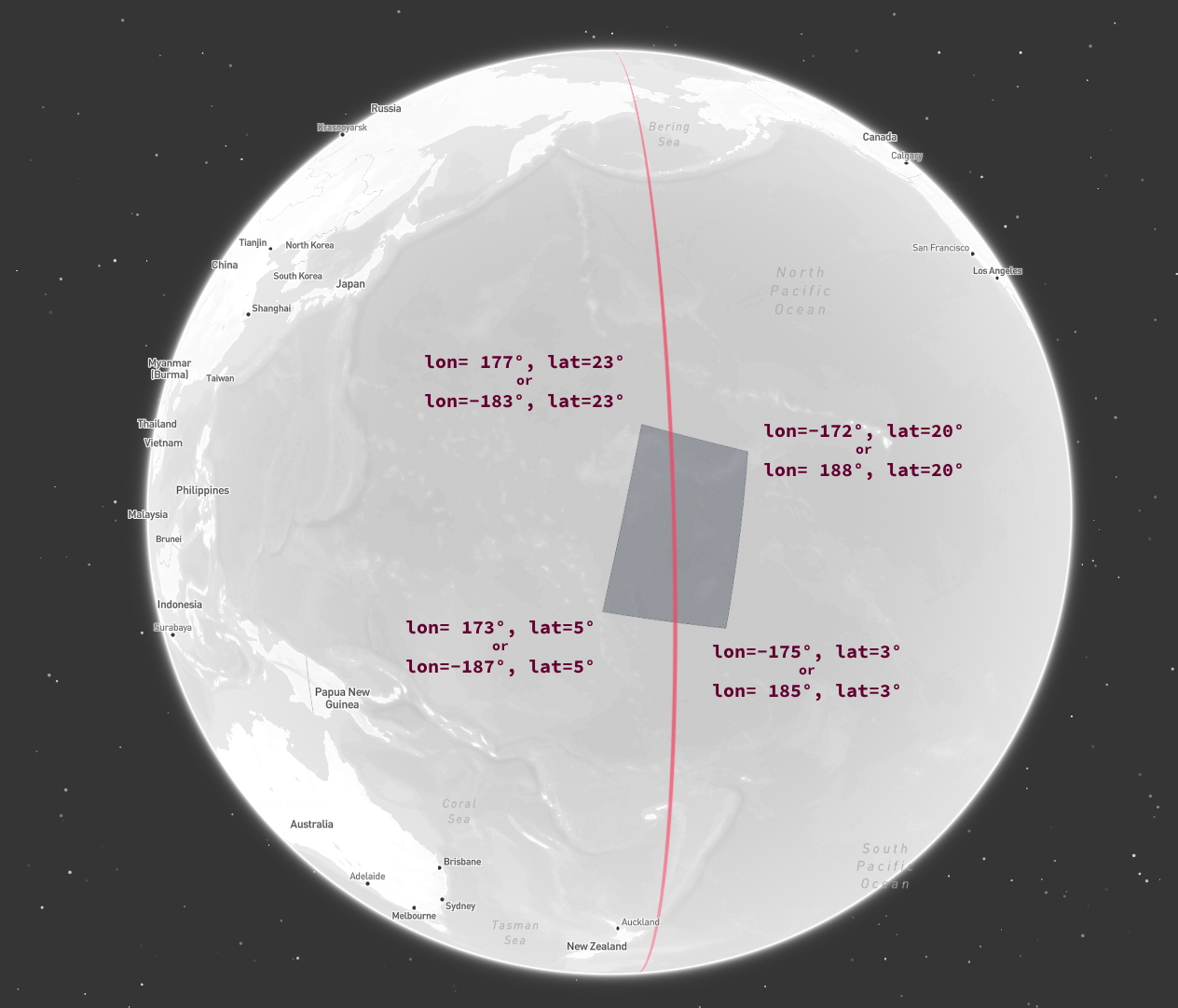 Below are a couple of different ways to express such a geometry.
```plaintext Using exact longitude / latitude coordinates for each point theme={"system"}
POLYGON ((173 5, -175 3, -172 20, 177 23, 173 5))
```
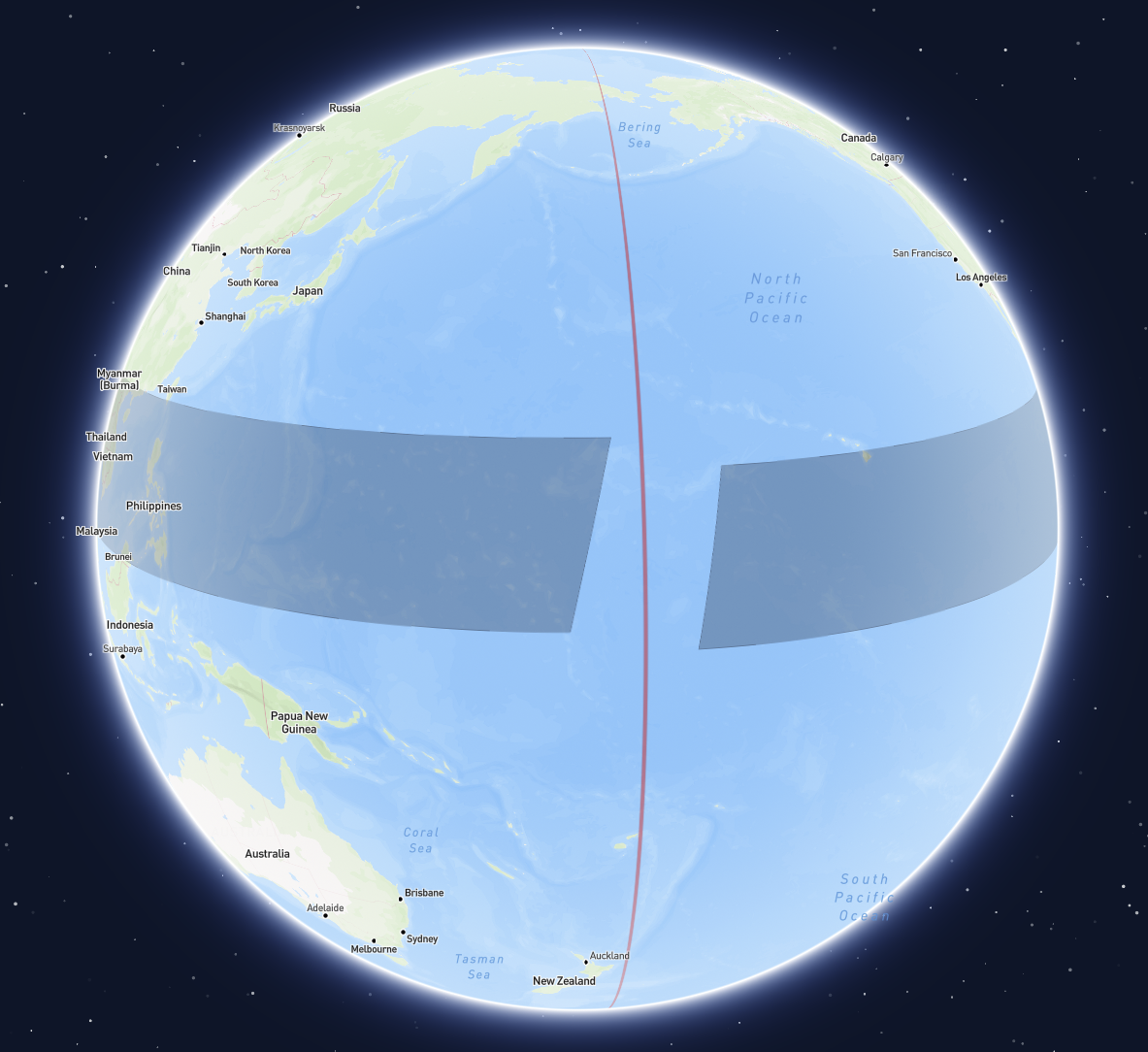
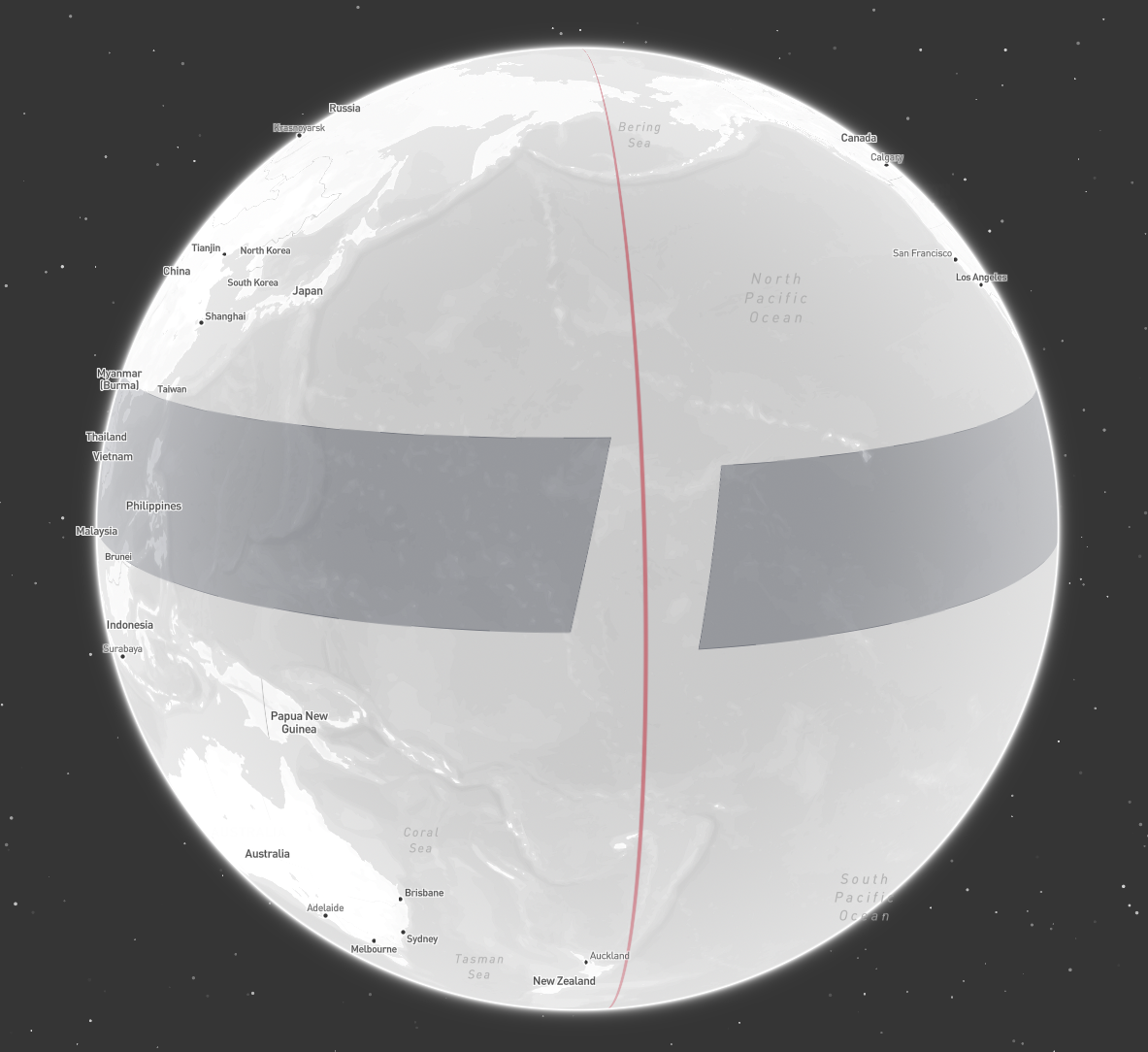
While valid, this representation can cause issues for many libraries performing calculations or visualizations in a Cartesian coordinate system. The line segment from `lon=173` to `lon=-175` is interpreted as a `348-degree` line crossing the null meridian, spanning nearly the entire globe.
Visualizations of such geometries often appear as shown below.
Below are a couple of different ways to express such a geometry.
```plaintext Using exact longitude / latitude coordinates for each point theme={"system"}
POLYGON ((173 5, -175 3, -172 20, 177 23, 173 5))
```
While valid, this representation can cause issues for many libraries performing calculations or visualizations in a Cartesian coordinate system. The line segment from `lon=173` to `lon=-175` is interpreted as a `348-degree` line crossing the null meridian, spanning nearly the entire globe.
Visualizations of such geometries often appear as shown below.
 To mitigate these issues, some Cartesian coordinate tools extend the longitude range beyond the usual `[-180, 180]` bounds.
Expressing the geometry in such a way, may look like this.
```plaintext Extending the longitude range beyond 180 theme={"system"}
POLYGON ((173 5, 185 3, 188 20, 177 23, 173 5))
```
Or, the exact same area on the globe can also be expressed as a geometry by extending the longitude range below `-180`.
```plaintext Extending the longitude range below -180 theme={"system"}
POLYGON ((-187 5, -175 3, -172 20, -183 23, -187 5))
```
While most visualization tools may handle such geometries correctly, special care is required for intersection and containment checks.
The following code snippet demonstrates this by constructing a Polygon that covers the same area using both methods and checking for intersection (which should logically occur, as they represent the same geographic area).
```python Incorrect intersection check theme={"system"}
from shapely import from_wkt
a = from_wkt("POLYGON ((173 5, 185 3, 188 20, 177 23, 173 5))")
b = from_wkt("POLYGON ((-187 5, -175 3, -172 20, -183 23, -187 5))")
print(a.intersects(b)) # False
```
### Antimeridian Cutting
Additionally, none of the representations shown are valid according to the GeoJSON specification. The GeoJSON specification does offers a solution for this problem, though, which is [Antimeridian Cutting](https://datatracker.ietf.org/doc/html/rfc7946#section-3.1.9).
It suggests always cutting lines and polygons that cross the antimeridian into two parts—one for the eastern hemisphere and one for the western hemisphere.
To achieve this, check out the [antimeridian](https://pypi.org/project/antimeridian/) python package, and an implementation of it in [Go](https://github.com/go-geospatial/antimeridian).
The `antimeridian` python package also is a great resource for [learning more about possible antimeridian issues](https://www.gadom.ski/antimeridian/latest/), how the [cutting algorithm](https://www.gadom.ski/antimeridian/latest/the-algorithm/) works and [edge cases](https://www.gadom.ski/antimeridian/latest/failure-modes/) to be aware of.
```plaintext Cutting the polygon along the antimeridian theme={"system"}
MULTIPOLYGON (
((180 22.265994, 177 23, 173 5, 180 3.855573, 180 22.265994)),
((-180 3.855573, -175 3, -172 20, -180 22.265994, -180 3.855573))
)
```
By cutting geometries along the antimeridian:
* they conform to the GeoJSON specification
* there is no ambiguity about how to correctly interpret the geometry
* they are correctly handled by most visualization tools
* intersection and containment checks yield correct results no matter the [coordinate reference system](/datasets/query/filter-by-location#coordinate-reference-system) used
* all longitude values are within the valid `[-180, 180]` range, making it easier to work with them
## Pole Coverings
Geometries covering a pole can be particularly challenging to handle correctly. No single algorithm addresses all cases, and different libraries and tools may interpret them differently.
Often, providing prior knowledge, such as confirming that a geometry is intended to cover a pole, can resolve these issues.
For an example of this, check out the relevant section in the [antimeridian documentation](https://www.gadom.ski/antimeridian/latest/failure-modes/#force-the-geometry-over-the-north-pole).
Generally speaking though, there are two approaches that work well:
### Approach 1: Cutting out a hole
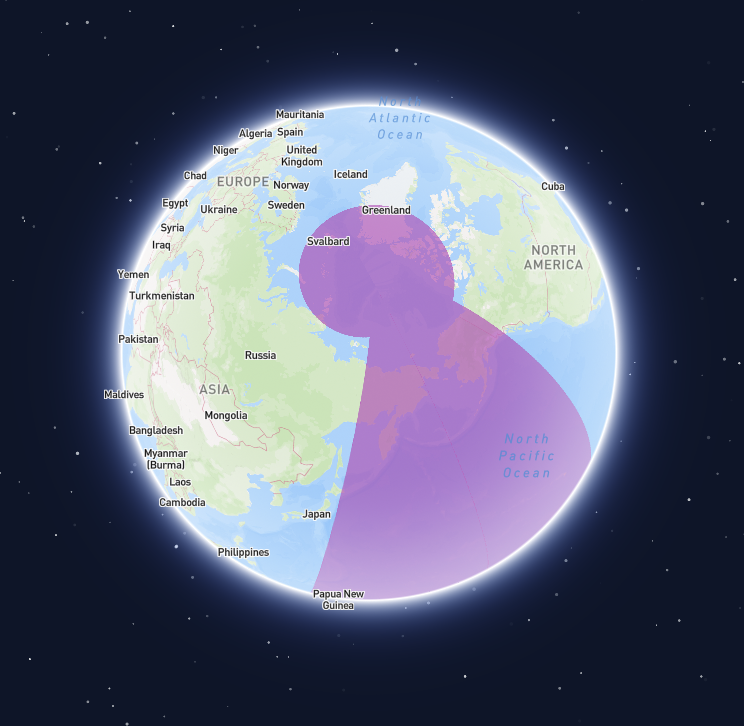
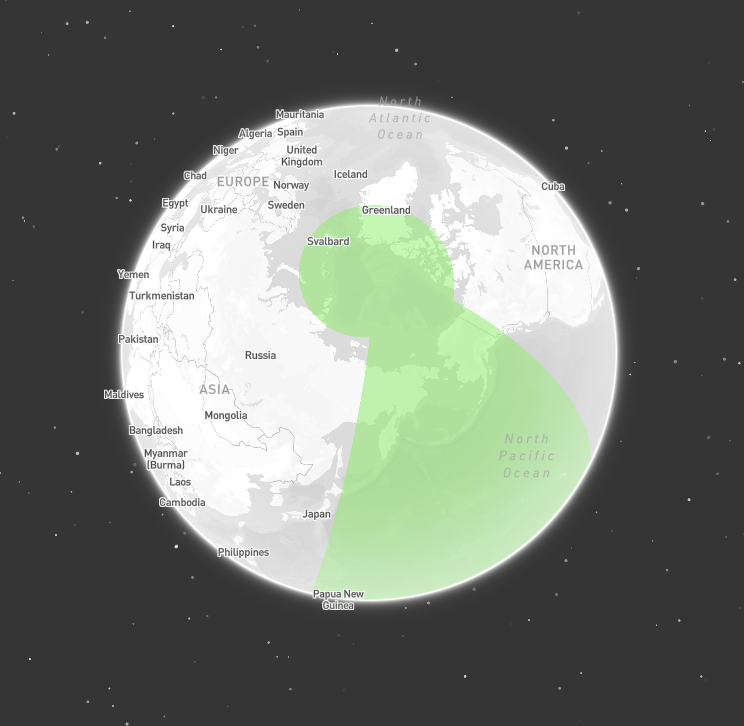
Define a geometry with an exterior ring that covers the whole globe. Then, cut out a hole by defining an interior ring of the area that not covered by the geometry.
This approach works especially well for geometries that cover both poles, since then the interior ring is guaranteed to not cover any poles.
To mitigate these issues, some Cartesian coordinate tools extend the longitude range beyond the usual `[-180, 180]` bounds.
Expressing the geometry in such a way, may look like this.
```plaintext Extending the longitude range beyond 180 theme={"system"}
POLYGON ((173 5, 185 3, 188 20, 177 23, 173 5))
```
Or, the exact same area on the globe can also be expressed as a geometry by extending the longitude range below `-180`.
```plaintext Extending the longitude range below -180 theme={"system"}
POLYGON ((-187 5, -175 3, -172 20, -183 23, -187 5))
```
While most visualization tools may handle such geometries correctly, special care is required for intersection and containment checks.
The following code snippet demonstrates this by constructing a Polygon that covers the same area using both methods and checking for intersection (which should logically occur, as they represent the same geographic area).
```python Incorrect intersection check theme={"system"}
from shapely import from_wkt
a = from_wkt("POLYGON ((173 5, 185 3, 188 20, 177 23, 173 5))")
b = from_wkt("POLYGON ((-187 5, -175 3, -172 20, -183 23, -187 5))")
print(a.intersects(b)) # False
```
### Antimeridian Cutting
Additionally, none of the representations shown are valid according to the GeoJSON specification. The GeoJSON specification does offers a solution for this problem, though, which is [Antimeridian Cutting](https://datatracker.ietf.org/doc/html/rfc7946#section-3.1.9).
It suggests always cutting lines and polygons that cross the antimeridian into two parts—one for the eastern hemisphere and one for the western hemisphere.
To achieve this, check out the [antimeridian](https://pypi.org/project/antimeridian/) python package, and an implementation of it in [Go](https://github.com/go-geospatial/antimeridian).
The `antimeridian` python package also is a great resource for [learning more about possible antimeridian issues](https://www.gadom.ski/antimeridian/latest/), how the [cutting algorithm](https://www.gadom.ski/antimeridian/latest/the-algorithm/) works and [edge cases](https://www.gadom.ski/antimeridian/latest/failure-modes/) to be aware of.
```plaintext Cutting the polygon along the antimeridian theme={"system"}
MULTIPOLYGON (
((180 22.265994, 177 23, 173 5, 180 3.855573, 180 22.265994)),
((-180 3.855573, -175 3, -172 20, -180 22.265994, -180 3.855573))
)
```
By cutting geometries along the antimeridian:
* they conform to the GeoJSON specification
* there is no ambiguity about how to correctly interpret the geometry
* they are correctly handled by most visualization tools
* intersection and containment checks yield correct results no matter the [coordinate reference system](/datasets/query/filter-by-location#coordinate-reference-system) used
* all longitude values are within the valid `[-180, 180]` range, making it easier to work with them
## Pole Coverings
Geometries covering a pole can be particularly challenging to handle correctly. No single algorithm addresses all cases, and different libraries and tools may interpret them differently.
Often, providing prior knowledge, such as confirming that a geometry is intended to cover a pole, can resolve these issues.
For an example of this, check out the relevant section in the [antimeridian documentation](https://www.gadom.ski/antimeridian/latest/failure-modes/#force-the-geometry-over-the-north-pole).
Generally speaking though, there are two approaches that work well:
### Approach 1: Cutting out a hole
Define a geometry with an exterior ring that covers the whole globe. Then, cut out a hole by defining an interior ring of the area that not covered by the geometry.
This approach works especially well for geometries that cover both poles, since then the interior ring is guaranteed to not cover any poles.
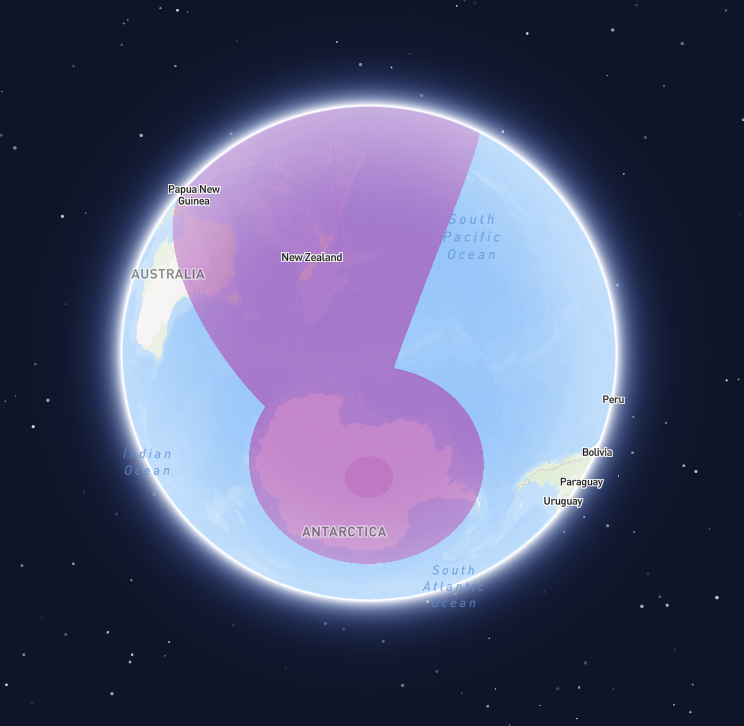
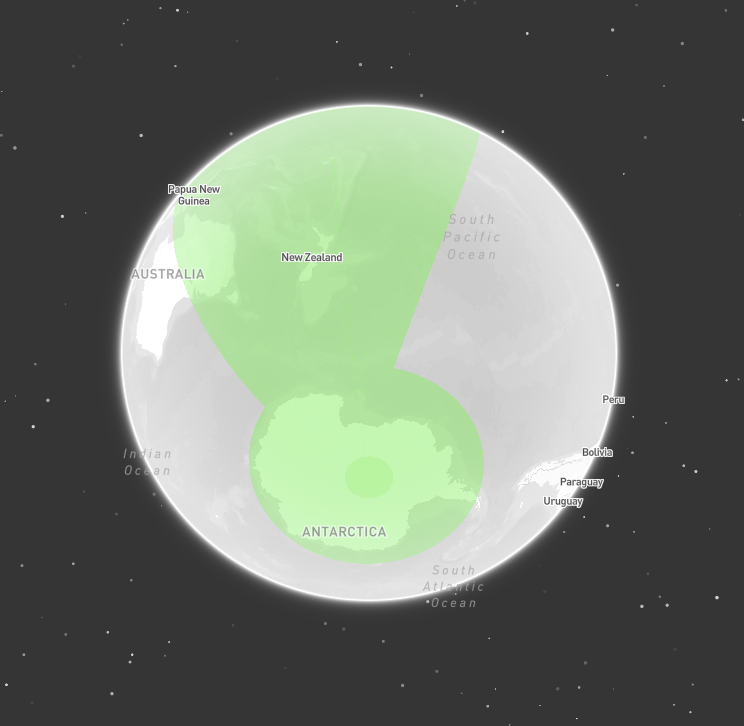 ```plaintext Polygon covering both poles theme={"system"}
POLYGON (
(-180 90, -180 -90, 180 -90, 180 90, -180 90),
(-133 72, 153 77, 130 -64, -160 -66, -133 72)
)
```
### Approach 2: Splitting into multiple parts
Another approach, effective for circular caps covering a pole, involves cutting the geometry into multiple parts. Instead of splitting the geometry only at the antimeridian, also split it at the null meridian, and the `90` and `-90` meridians.
For a circular cap covering the north pole, this results in four triangular parts, which can be combined into a `MultiPolygon`. Visualization libraries and intersection/containment checks performed in cartesian coordinate space will typically handle such a geometry correctly.
```plaintext Polygon covering both poles theme={"system"}
POLYGON (
(-180 90, -180 -90, 180 -90, 180 90, -180 90),
(-133 72, 153 77, 130 -64, -160 -66, -133 72)
)
```
### Approach 2: Splitting into multiple parts
Another approach, effective for circular caps covering a pole, involves cutting the geometry into multiple parts. Instead of splitting the geometry only at the antimeridian, also split it at the null meridian, and the `90` and `-90` meridians.
For a circular cap covering the north pole, this results in four triangular parts, which can be combined into a `MultiPolygon`. Visualization libraries and intersection/containment checks performed in cartesian coordinate space will typically handle such a geometry correctly.
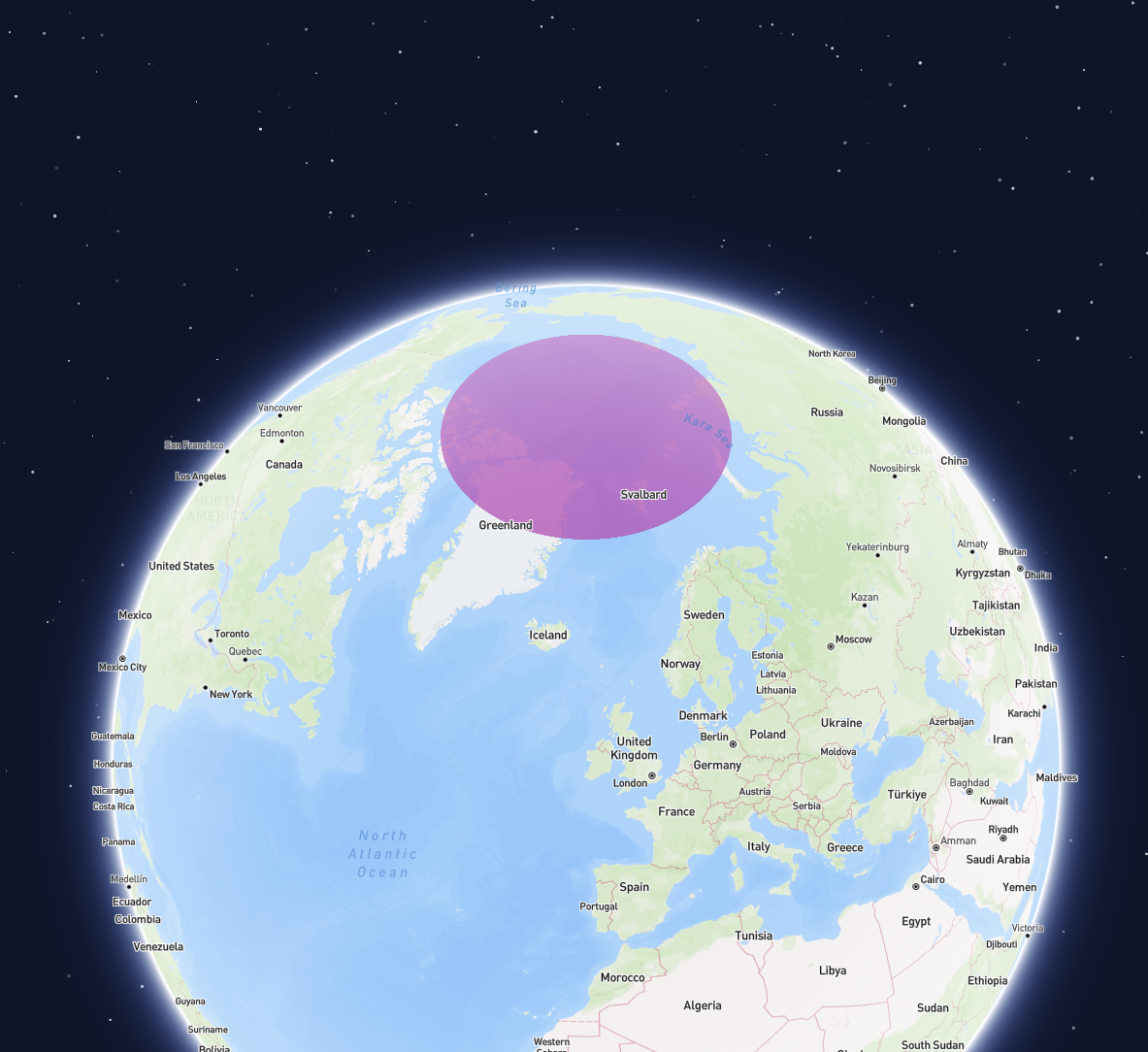
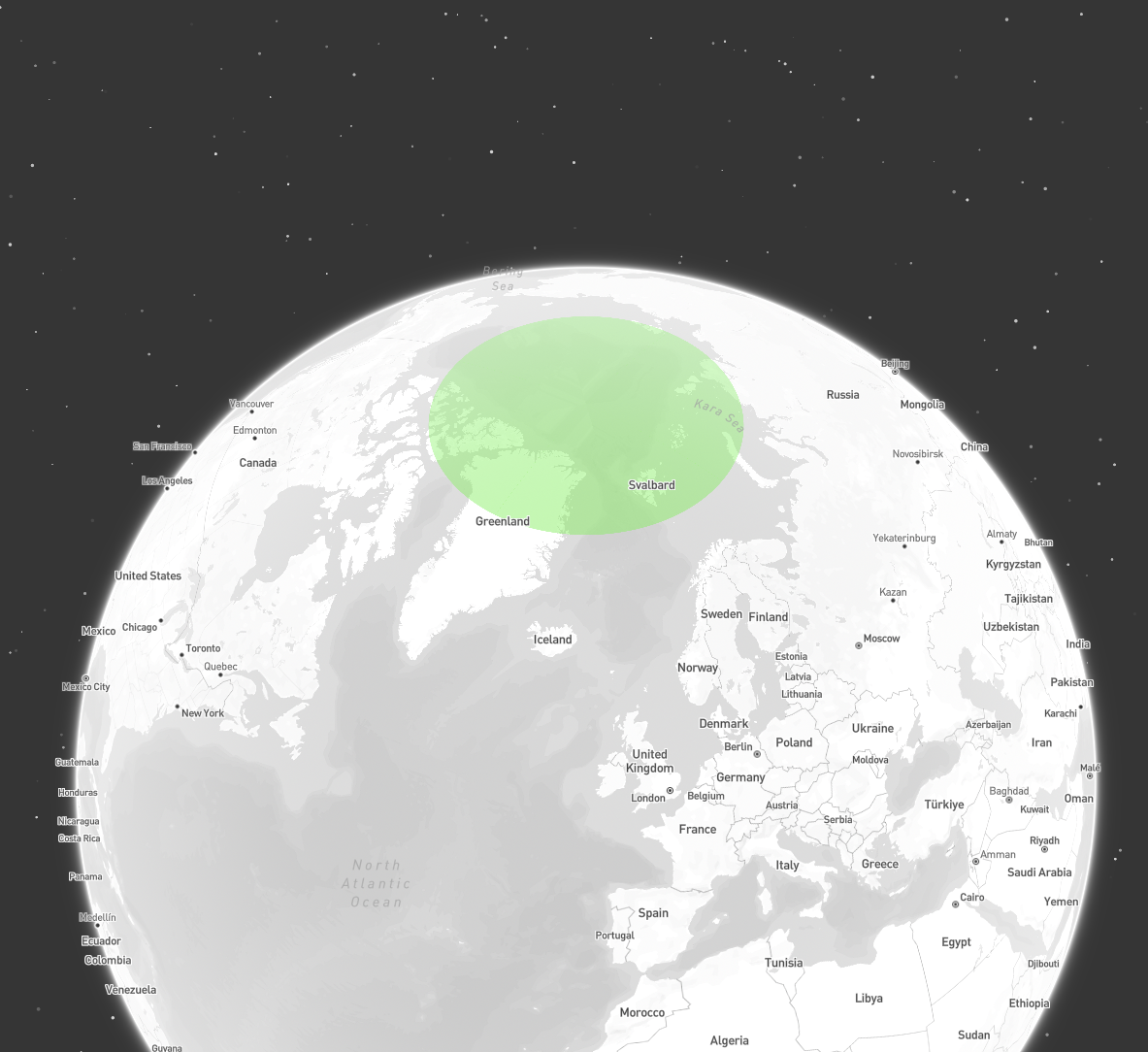 ```plaintext Geometry of a circular cap covering the north pole theme={"system"}
MULTIPOLYGON (
((-90 75, 0 75, 0 90, -90 90, -90 75)),
((0 75, 90 75, 90 90, 0 90, 0 75)),
((90 75, 180 75, 180 90, 90 90, 90 75)),
((-180 75, -90 75, -90 90, -180 90, -180 75))
)
```
```plaintext Geometry of a circular cap covering the north pole theme={"system"}
MULTIPOLYGON (
((-90 75, 0 75, 0 90, -90 90, -90 75)),
((0 75, 90 75, 90 90, 0 90, 0 75)),
((90 75, 180 75, 180 90, 90 90, 90 75)),
((-180 75, -90 75, -90 90, -180 90, -180 75))
)
```