> ## Documentation Index
> Fetch the complete documentation index at: https://docs.tilebox.com/llms.txt
> Use this file to discover all available pages before exploring further.
# Filtering by a location
> Narrow down your query results to only include datapoints within a specific geographic area of interest by providing a geometry for the target region.
Check out the [best practices for handling geometries](/datasets/geometries) to learn more about the different aspects to consider when working with geometries, including antimeridian crossings and pole coverings.
When querying, you can specify arbitrary geometries as an area of interest. Tilebox currently supports `Polygon` and `MultiPolygon` geometries as query filters.
## Filtering by Area of Interest
To filter by an area of interest, use a `Polygon` or `MultiPolygon` geometry as the spatial extent parameter.
Here is how to query Sentinel-2 `L2A` data over Colorado for a specific day in April 2025.
```python Python theme={"system"}
from shapely import Polygon
from tilebox.datasets import Client
area = Polygon( # area roughly covering the state of Colorado
((-109.05, 41.00), (-109.045, 37.0), (-102.05, 37.0), (-102.05, 41.00), (-109.05, 41.00)),
)
client = Client()
sentinel2_msi = client.dataset("open_data.copernicus.sentinel2_msi")
data = sentinel2_msi.query(
collections=["S2A_S2MSI2A", "S2B_S2MSI2A", "S2C_S2MSI2A"],
temporal_extent=("2025-04-02", "2025-04-03"),
spatial_extent=area,
)
```
```go Go theme={"system"}
startDate := time.Date(2025, 4, 2, 0, 0, 0, 0, time.UTC)
endDate := time.Date(2025, 4, 3, 0, 0, 0, 0, time.UTC)
area := orb.Polygon{ // area roughly covering the state of Colorado
{{-109.05, 41.00}, {-109.045, 37.0}, {-102.05, 37.0}, {-102.05, 41.00}, {-109.05, 41.00}},
}
ctx := context.Background()
client := datasets.NewClient()
dataset, err := client.Datasets.Get(ctx, "open_data.copernicus.sentinel2_msi")
if err != nil {
log.Fatalf("Failed to get dataset: %v", err)
}
collection, err := client.Collections.Get(ctx, dataset.ID, "S2A_S2MSI2A")
if err != nil {
log.Fatalf("Failed to get collection: %v", err)
}
collectionB, err := client.Collections.Get(ctx, dataset.ID, "S2B_S2MSI2A")
if err != nil {
log.Fatalf("Failed to get collection: %v", err)
}
collectionC, err := client.Collections.Get(ctx, dataset.ID, "S2C_S2MSI2A")
if err != nil {
log.Fatalf("Failed to get collection: %v", err)
}
var datapoints []*v1.Sentinel2Msi
err = client.Datapoints.QueryInto(ctx,
dataset.ID,
&datapoints,
datasets.WithCollectionIDs(collection.ID, collectionB.ID, collectionC.ID),
datasets.WithTemporalExtent(query.NewTimeInterval(startDate, endDate)),
datasets.WithSpatialExtent(area),
)
if err != nil {
log.Fatalf("Failed to query datapoints: %v", err)
}
```
## Intersection mode
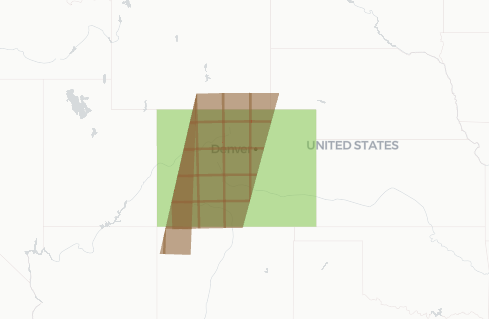
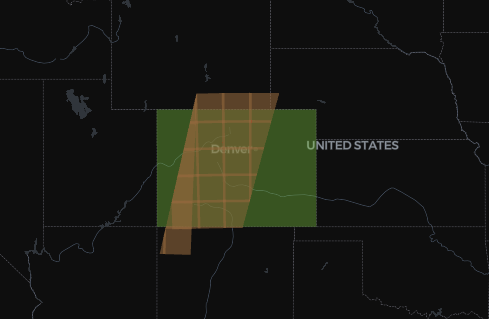
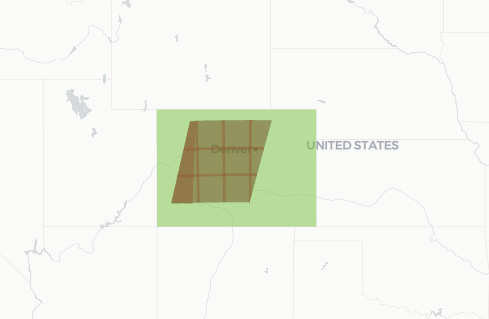
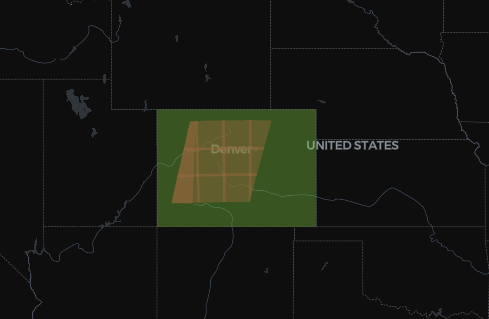
By default, queries return all datapoints that intersect with the specified geometry. You can alter this behavior to return only datapoints fully contained within the geometry. Tilebox supports this by allowing you to specify a mode for the spatial filter.
 ### Intersects
The `intersects` mode is the default for spatial queries. It matches all datapoints whose geometries intersect with the query geometry.
```python Python theme={"system"}
area = Polygon( # area roughly covering the state of Colorado
((-109.05, 41.00), (-109.045, 37.0), (-102.05, 37.0), (-102.05, 41.00), (-109.05, 41.00)),
)
data = dataset.query(
temporal_extent=("2025-04-02", "2025-04-03"),
# intersects is the default, so can also be omitted entirely
spatial_extent={"geometry": area, "mode": "intersects"},
)
print(f"There are {data.sizes['time']} Sentinel-2A granules intersecting the area of Colorado on April 2nd, 2025")
```
```go Go theme={"system"}
startDate := time.Date(2025, 4, 2, 0, 0, 0, 0, time.UTC)
endDate := time.Date(2025, 4, 3, 0, 0, 0, 0, time.UTC)
area := orb.Polygon{ // area roughly covering the state of Colorado
{{-109.05, 41.00}, {-109.045, 37.0}, {-102.05, 37.0}, {-102.05, 41.00}, {-109.05, 41.00}},
}
var datapoints []*examplesv1.Sentinel2Msi
err = client.Datapoints.QueryInto(ctx,
dataset.ID,
&datapoints,
datasets.WithTemporalExtent(query.NewTimeInterval(startDate, endDate)),
datasets.WithSpatialExtentFilter(&query.SpatialFilter{
Geometry: area,
// intersects is the default, so can also be omitted entirely
Mode: datasetsv1.SpatialFilterMode_SPATIAL_FILTER_MODE_INTERSECTS,
}),
)
if err != nil {
log.Fatalf("Failed to query datapoints: %v", err)
}
```
```plaintext Output theme={"system"}
There are 27 Sentinel-2A granules intersecting the area of Colorado on April 2nd, 2025
```
### Contains
The `contains` mode matches all datapoints whose geometries are fully contained within the query geometry.
```python Python theme={"system"}
area = Polygon( # area roughly covering the state of Colorado
((-109.05, 41.00), (-109.045, 37.0), (-102.05, 37.0), (-102.05, 41.00), (-109.05, 41.00)),
)
data = collection.query(
temporal_extent=("2025-04-01", "2025-05-02"),
spatial_extent={"geometry": area, "mode": "contains"},
)
print(f"There are {data.sizes['time']} Sentinel-2A granules fully contained within the area of Colorado on April 2nd, 2025")
```
```go Go theme={"system"}
startDate := time.Date(2025, 4, 2, 0, 0, 0, 0, time.UTC)
endDate := time.Date(2025, 5, 2, 0, 0, 0, 0, time.UTC)
area := orb.Polygon{ // area roughly covering the state of Colorado
{{-109.05, 41.00}, {-109.045, 37.0}, {-102.05, 37.0}, {-102.05, 41.00}, {-109.05, 41.00}},
}
var datapoints []*examplesv1.Sentinel2Msi
err = client.Datapoints.QueryInto(ctx,
dataset.ID,
&datapoints,
datasets.WithCollectionIDs(collection.ID),
datasets.WithTemporalExtent(query.NewTimeInterval(startDate, endDate)),
datasets.WithSpatialExtentFilter(&query.SpatialFilter{
Geometry: area,
Mode: datasetsv1.SpatialFilterMode_SPATIAL_FILTER_MODE_CONTAINS,
}),
)
if err != nil {
log.Fatalf("Failed to query datapoints: %v", err)
}
```
```plaintext Output theme={"system"}
There are 16 Sentinel-2A granules fully contained within the area of Colorado on April 2nd, 2025
```
## Antimeridian Crossings
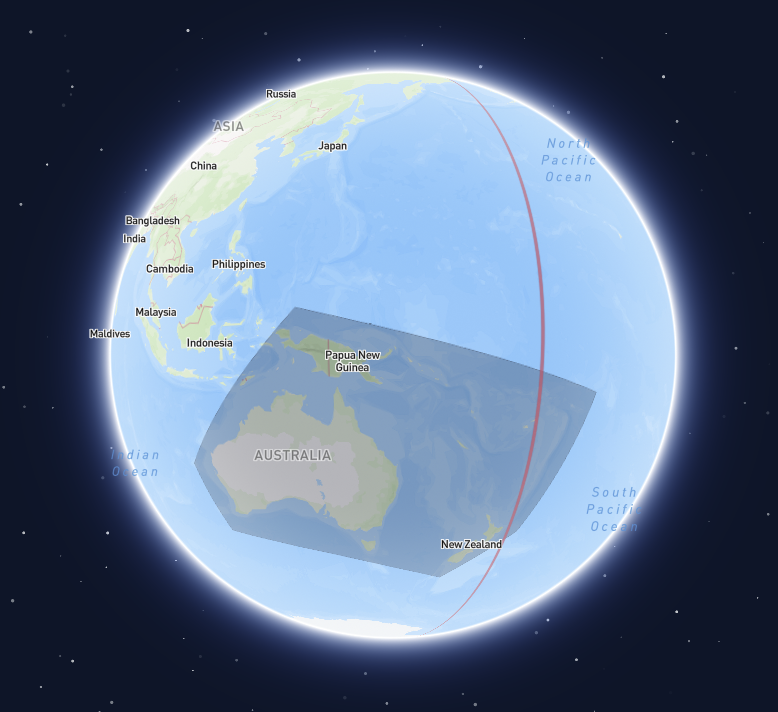
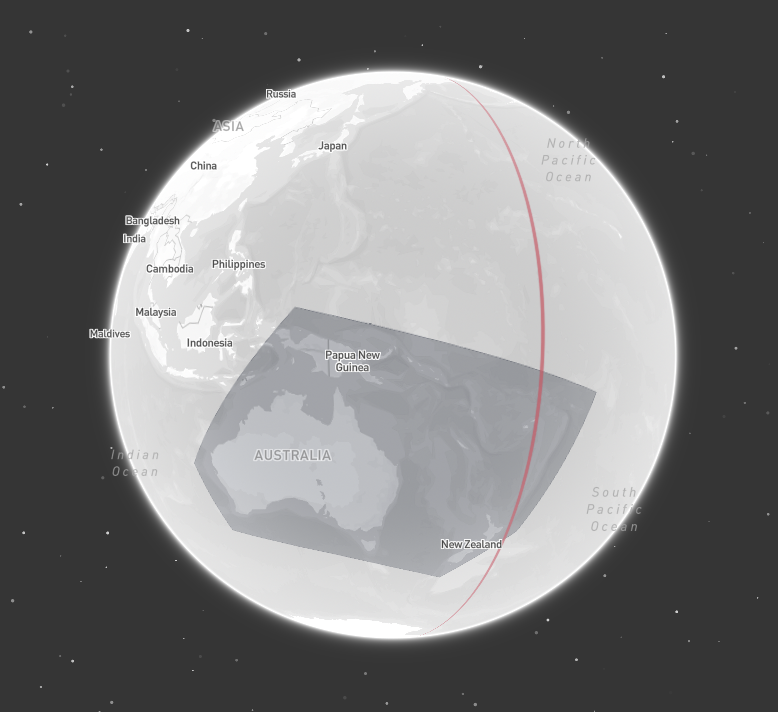
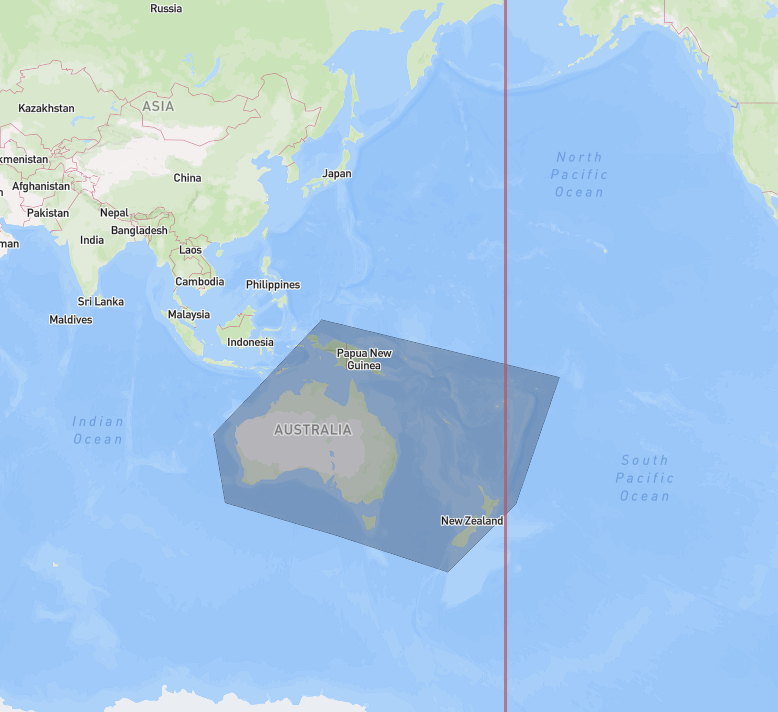
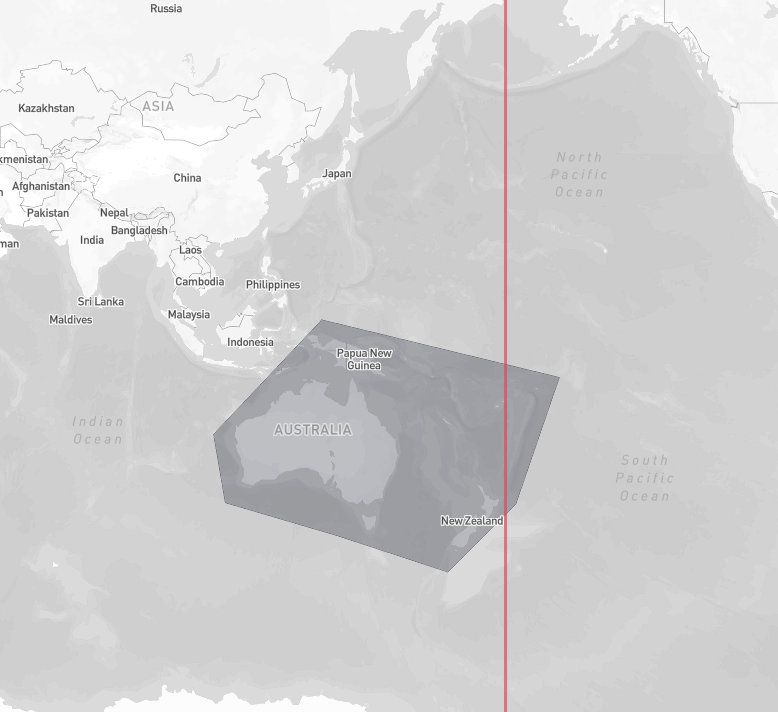
In many applications, geometries that cross the antimeridian cause issues. Since such geometries are common in satellite
data, Tilebox does take extra care to handle them out of the box correctly, by building the necessary internal spatial
index structures in a way that correctly handles antimeridian crossings and pole coverings.
To get accurate results also at query time, it's recommend to use the `spherical` [coordinate reference system](#coordinate-reference-system)
for querying (which is the default), as it correctly handles the non-linearity introduced by the antimeridian in `cartesian` space.
Even if you stick to the `spherical` coordinate reference system when querying, it's still recommended to follow the
[best practices for handling geometries](/datasets/geometries). In doing so,
you can ensure that no geometry related issues will arise even when interfacing with other libraries and tools that may not properly
support non-linearities in geometries.
## Coordinate reference system
Geometry intersection and containment checks can either be performed in a [3D spherical coordinate system](https://en.wikipedia.org/wiki/Spherical_coordinate_system)
or in a standard 2D cartesian `lat/lon` coordinate system.
### Intersects
The `intersects` mode is the default for spatial queries. It matches all datapoints whose geometries intersect with the query geometry.
```python Python theme={"system"}
area = Polygon( # area roughly covering the state of Colorado
((-109.05, 41.00), (-109.045, 37.0), (-102.05, 37.0), (-102.05, 41.00), (-109.05, 41.00)),
)
data = dataset.query(
temporal_extent=("2025-04-02", "2025-04-03"),
# intersects is the default, so can also be omitted entirely
spatial_extent={"geometry": area, "mode": "intersects"},
)
print(f"There are {data.sizes['time']} Sentinel-2A granules intersecting the area of Colorado on April 2nd, 2025")
```
```go Go theme={"system"}
startDate := time.Date(2025, 4, 2, 0, 0, 0, 0, time.UTC)
endDate := time.Date(2025, 4, 3, 0, 0, 0, 0, time.UTC)
area := orb.Polygon{ // area roughly covering the state of Colorado
{{-109.05, 41.00}, {-109.045, 37.0}, {-102.05, 37.0}, {-102.05, 41.00}, {-109.05, 41.00}},
}
var datapoints []*examplesv1.Sentinel2Msi
err = client.Datapoints.QueryInto(ctx,
dataset.ID,
&datapoints,
datasets.WithTemporalExtent(query.NewTimeInterval(startDate, endDate)),
datasets.WithSpatialExtentFilter(&query.SpatialFilter{
Geometry: area,
// intersects is the default, so can also be omitted entirely
Mode: datasetsv1.SpatialFilterMode_SPATIAL_FILTER_MODE_INTERSECTS,
}),
)
if err != nil {
log.Fatalf("Failed to query datapoints: %v", err)
}
```
```plaintext Output theme={"system"}
There are 27 Sentinel-2A granules intersecting the area of Colorado on April 2nd, 2025
```
### Contains
The `contains` mode matches all datapoints whose geometries are fully contained within the query geometry.
```python Python theme={"system"}
area = Polygon( # area roughly covering the state of Colorado
((-109.05, 41.00), (-109.045, 37.0), (-102.05, 37.0), (-102.05, 41.00), (-109.05, 41.00)),
)
data = collection.query(
temporal_extent=("2025-04-01", "2025-05-02"),
spatial_extent={"geometry": area, "mode": "contains"},
)
print(f"There are {data.sizes['time']} Sentinel-2A granules fully contained within the area of Colorado on April 2nd, 2025")
```
```go Go theme={"system"}
startDate := time.Date(2025, 4, 2, 0, 0, 0, 0, time.UTC)
endDate := time.Date(2025, 5, 2, 0, 0, 0, 0, time.UTC)
area := orb.Polygon{ // area roughly covering the state of Colorado
{{-109.05, 41.00}, {-109.045, 37.0}, {-102.05, 37.0}, {-102.05, 41.00}, {-109.05, 41.00}},
}
var datapoints []*examplesv1.Sentinel2Msi
err = client.Datapoints.QueryInto(ctx,
dataset.ID,
&datapoints,
datasets.WithCollectionIDs(collection.ID),
datasets.WithTemporalExtent(query.NewTimeInterval(startDate, endDate)),
datasets.WithSpatialExtentFilter(&query.SpatialFilter{
Geometry: area,
Mode: datasetsv1.SpatialFilterMode_SPATIAL_FILTER_MODE_CONTAINS,
}),
)
if err != nil {
log.Fatalf("Failed to query datapoints: %v", err)
}
```
```plaintext Output theme={"system"}
There are 16 Sentinel-2A granules fully contained within the area of Colorado on April 2nd, 2025
```
## Antimeridian Crossings
In many applications, geometries that cross the antimeridian cause issues. Since such geometries are common in satellite
data, Tilebox does take extra care to handle them out of the box correctly, by building the necessary internal spatial
index structures in a way that correctly handles antimeridian crossings and pole coverings.
To get accurate results also at query time, it's recommend to use the `spherical` [coordinate reference system](#coordinate-reference-system)
for querying (which is the default), as it correctly handles the non-linearity introduced by the antimeridian in `cartesian` space.
Even if you stick to the `spherical` coordinate reference system when querying, it's still recommended to follow the
[best practices for handling geometries](/datasets/geometries). In doing so,
you can ensure that no geometry related issues will arise even when interfacing with other libraries and tools that may not properly
support non-linearities in geometries.
## Coordinate reference system
Geometry intersection and containment checks can either be performed in a [3D spherical coordinate system](https://en.wikipedia.org/wiki/Spherical_coordinate_system)
or in a standard 2D cartesian `lat/lon` coordinate system.
 ### Spherical
The `spherical` coordinate reference system is the default and recommended choice. It correctly handles antimeridian
crossings and is the most robust option, regardless of how datapoint geometries are cut along the antimeridian.
To learn more about antimeridian crossings and how to handle them correctly, check out the [Antimeridian Crossings section](#antimeridian-crossings) above.
When querying with the `spherical` coordinate reference system, Tilebox automatically converts all geometries to
their `x, y, z` coordinates on the unit sphere and performs the intersection and containment checks in 3D.
```python Python theme={"system"}
area = Polygon( # area roughly covering the state of Colorado
((-109.05, 41.00), (-109.045, 37.0), (-102.05, 37.0), (-102.05, 41.00), (-109.05, 41.00)),
)
data = dataset.query(
temporal_extent=("2025-04-01", "2025-05-02"),
# spherical is the default, so can also be omitted entirely
spatial_extent={"geometry": area, "coordinate_system": "spherical"},
)
```
```go Go theme={"system"}
startDate := time.Date(2025, 4, 2, 0, 0, 0, 0, time.UTC)
endDate := time.Date(2025, 5, 2, 0, 0, 0, 0, time.UTC)
area := orb.Polygon{ // area roughly covering the state of Colorado
{{-109.05, 41.00}, {-109.045, 37.0}, {-102.05, 37.0}, {-102.05, 41.00}, {-109.05, 41.00}},
}
var datapoints []*examplesv1.Sentinel2Msi
err = client.Datapoints.QueryInto(ctx,
dataset.ID,
&datapoints,
datasets.WithTemporalExtent(query.NewTimeInterval(startDate, endDate)),
datasets.WithSpatialExtentFilter(&query.SpatialFilter{
Geometry: area,
// spherical is the default, so can also be omitted entirely
CoordinateSystem: datasetsv1.SpatialCoordinateSystem_SPATIAL_COORDINATE_SYSTEM_SPHERICAL,
}),
)
if err != nil {
log.Fatalf("Failed to query datapoints: %v", err)
}
```
### Cartesian
Tilebox can also be configured to use a standard 2D cartesian `lat/lon` coordinate system for geometry intersection and containment checks.
This is done by specifying the `cartesian` coordinate reference system when querying.
```python Python theme={"system"}
area = Polygon( # area roughly covering the state of Colorado
((-109.05, 41.00), (-109.045, 37.0), (-102.05, 37.0), (-102.05, 41.00), (-109.05, 41.00)),
)
data = dataset.query(
temporal_extent=("2025-04-01", "2025-05-02"),
spatial_extent={"geometry": area, "coordinate_system": "cartesian"},
)
```
```go Go theme={"system"}
startDate := time.Date(2025, 4, 2, 0, 0, 0, 0, time.UTC)
endDate := time.Date(2025, 5, 2, 0, 0, 0, 0, time.UTC)
area := orb.Polygon{ // area roughly covering the state of Colorado
{{-109.05, 41.00}, {-109.045, 37.0}, {-102.05, 37.0}, {-102.05, 41.00}, {-109.05, 41.00}},
}
var datapoints []*examplesv1.Sentinel2Msi
err = client.Datapoints.QueryInto(ctx,
dataset.ID,
&datapoints,
datasets.WithTemporalExtent(query.NewTimeInterval(startDate, endDate)),
datasets.WithSpatialExtentFilter(&query.SpatialFilter{
Geometry: area,
CoordinateSystem: datasetsv1.SpatialCoordinateSystem_SPATIAL_COORDINATE_SYSTEM_CARTESIAN,
}),
)
if err != nil {
log.Fatalf("Failed to query datapoints: %v", err)
}
```
When using the `cartesian` coordinate system, antimeridian crossings may cause issues if datapoint geometries
or the query geometry do not properly respect the antimeridian cut. Check out the [best practices](/datasets/geometries#best-practices)
for handling geometries to learn more about how to avoid such issues.
### Spherical
The `spherical` coordinate reference system is the default and recommended choice. It correctly handles antimeridian
crossings and is the most robust option, regardless of how datapoint geometries are cut along the antimeridian.
To learn more about antimeridian crossings and how to handle them correctly, check out the [Antimeridian Crossings section](#antimeridian-crossings) above.
When querying with the `spherical` coordinate reference system, Tilebox automatically converts all geometries to
their `x, y, z` coordinates on the unit sphere and performs the intersection and containment checks in 3D.
```python Python theme={"system"}
area = Polygon( # area roughly covering the state of Colorado
((-109.05, 41.00), (-109.045, 37.0), (-102.05, 37.0), (-102.05, 41.00), (-109.05, 41.00)),
)
data = dataset.query(
temporal_extent=("2025-04-01", "2025-05-02"),
# spherical is the default, so can also be omitted entirely
spatial_extent={"geometry": area, "coordinate_system": "spherical"},
)
```
```go Go theme={"system"}
startDate := time.Date(2025, 4, 2, 0, 0, 0, 0, time.UTC)
endDate := time.Date(2025, 5, 2, 0, 0, 0, 0, time.UTC)
area := orb.Polygon{ // area roughly covering the state of Colorado
{{-109.05, 41.00}, {-109.045, 37.0}, {-102.05, 37.0}, {-102.05, 41.00}, {-109.05, 41.00}},
}
var datapoints []*examplesv1.Sentinel2Msi
err = client.Datapoints.QueryInto(ctx,
dataset.ID,
&datapoints,
datasets.WithTemporalExtent(query.NewTimeInterval(startDate, endDate)),
datasets.WithSpatialExtentFilter(&query.SpatialFilter{
Geometry: area,
// spherical is the default, so can also be omitted entirely
CoordinateSystem: datasetsv1.SpatialCoordinateSystem_SPATIAL_COORDINATE_SYSTEM_SPHERICAL,
}),
)
if err != nil {
log.Fatalf("Failed to query datapoints: %v", err)
}
```
### Cartesian
Tilebox can also be configured to use a standard 2D cartesian `lat/lon` coordinate system for geometry intersection and containment checks.
This is done by specifying the `cartesian` coordinate reference system when querying.
```python Python theme={"system"}
area = Polygon( # area roughly covering the state of Colorado
((-109.05, 41.00), (-109.045, 37.0), (-102.05, 37.0), (-102.05, 41.00), (-109.05, 41.00)),
)
data = dataset.query(
temporal_extent=("2025-04-01", "2025-05-02"),
spatial_extent={"geometry": area, "coordinate_system": "cartesian"},
)
```
```go Go theme={"system"}
startDate := time.Date(2025, 4, 2, 0, 0, 0, 0, time.UTC)
endDate := time.Date(2025, 5, 2, 0, 0, 0, 0, time.UTC)
area := orb.Polygon{ // area roughly covering the state of Colorado
{{-109.05, 41.00}, {-109.045, 37.0}, {-102.05, 37.0}, {-102.05, 41.00}, {-109.05, 41.00}},
}
var datapoints []*examplesv1.Sentinel2Msi
err = client.Datapoints.QueryInto(ctx,
dataset.ID,
&datapoints,
datasets.WithTemporalExtent(query.NewTimeInterval(startDate, endDate)),
datasets.WithSpatialExtentFilter(&query.SpatialFilter{
Geometry: area,
CoordinateSystem: datasetsv1.SpatialCoordinateSystem_SPATIAL_COORDINATE_SYSTEM_CARTESIAN,
}),
)
if err != nil {
log.Fatalf("Failed to query datapoints: %v", err)
}
```
When using the `cartesian` coordinate system, antimeridian crossings may cause issues if datapoint geometries
or the query geometry do not properly respect the antimeridian cut. Check out the [best practices](/datasets/geometries#best-practices)
for handling geometries to learn more about how to avoid such issues.