> ## Documentation Index
> Fetch the complete documentation index at: https://docs.tilebox.com/llms.txt
> Use this file to discover all available pages before exploring further.
# Access Copernicus data
> Download Copernicus Data Space products with the Tilebox Copernicus storage client, using Sentinel-2 as an example.
Use this guide when you already have a Copernicus datapoint from a Tilebox metadata query and want to access the product files behind it. The example uses Sentinel-2 Level-2A data, but the same storage client pattern applies to Copernicus products supported by Tilebox.
Tilebox indexes product metadata as datasets. Product files remain in the Copernicus Data Space Ecosystem, so file access uses the `CopernicusStorageClient` with Copernicus S3 credentials.
## Prerequisites
* You have a [Tilebox API key](/authentication).
* You have installed the [Python SDK](/sdks/python/install).
* You have a [Copernicus Data Space](https://dataspace.copernicus.eu/) account.
* You have generated Copernicus [S3 credentials](https://eodata-s3keysmanager.dataspace.copernicus.eu/panel/s3-credentials).
```bash theme={"system"}
uv add tilebox shapely
```
## Select a Sentinel-2 datapoint
Start with a small metadata query and select one datapoint to access. For a deeper guide to open data discovery and metadata filtering, see [Query open data metadata](/guides/datasets/query-satellite-data).
```python Python theme={"system"}
from shapely import Polygon
from tilebox.datasets import Client
area = Polygon(
[
(-109.05, 37.0),
(-102.05, 37.0),
(-102.05, 41.0),
(-109.05, 41.0),
(-109.05, 37.0),
]
)
client = Client()
collection = client.dataset("open_data.copernicus.sentinel2_msi").collection("S2A_S2MSI2A")
scenes = collection.query(
temporal_extent=("2025-10-01", "2025-11-01"),
spatial_extent=area,
show_progress=True,
)
selected = scenes.where(scenes.cloud_cover < 10, drop=True).isel(time=0)
print(selected.granule_name.item())
```
## Create the Copernicus storage client
Create a `CopernicusStorageClient` with your Copernicus S3 credentials. The optional `cache_directory` controls where downloaded files are stored locally.
```python Python theme={"system"}
from pathlib import Path
from tilebox.storage import CopernicusStorageClient
storage = CopernicusStorageClient(
access_key="YOUR_COPERNICUS_ACCESS_KEY",
secret_access_key="YOUR_COPERNICUS_SECRET_ACCESS_KEY",
cache_directory=Path("./data"),
)
```
These credentials are Copernicus Data Space S3 credentials, not your Tilebox API key.
## Download the complete product
Use `download` when you need the complete Sentinel-2 product directory. The storage client resolves the product location from the Tilebox datapoint metadata and downloads the matching files into the local cache directory.
```python Python theme={"system"}
product_path = storage.download(selected)
print(f"Downloaded {product_path.name} to {product_path}")
print("Contents:")
for path in product_path.iterdir():
print(f"- {path.relative_to(product_path)}")
```
```plaintext Output theme={"system"}
Downloaded S2A_MSIL2A_20251002T180751_N0511_R084_T13TEE_20251002T225842.SAFE to data/Sentinel-2/MSI/L2A/2025/10/02/S2A_MSIL2A_20251002T180751_N0511_R084_T13TEE_20251002T225842.SAFE
Contents:
- manifest.safe
- GRANULE
- INSPIRE.xml
- MTD_MSIL2A.xml
- DATASTRIP
- HTML
- rep_info
- S2A_MSIL2A_20251002T180751_N0511_R084_T13TEE_20251002T225842-ql.jpg
```
## Download selected product files
Sentinel-2 products contain many files, including metadata, masks, quicklook images, and bands at different resolutions. Use `list_objects` and `download_objects` when you only need specific files.
```python Python theme={"system"}
objects = storage.list_objects(selected)
wanted_bands = ["B02_10m", "B03_10m", "B04_10m", "B08_10m"]
band_objects = [
obj for obj in objects
if any(band in obj for band in wanted_bands)
]
for obj in band_objects:
print(obj)
downloaded_files = storage.download_objects(selected, band_objects)
print(downloaded_files)
```
Use this pattern when a workflow only needs a few bands or metadata files. It reduces transfer time and local storage compared with downloading the full `.SAFE` product.
## Preview the product
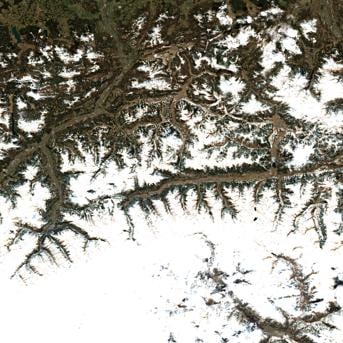
Many Copernicus products include a quicklook image. In a notebook, use `quicklook` to display the product preview without downloading the full product first.
```python Python theme={"system"}
storage.quicklook(selected)
```
 ## Next steps
Find Copernicus products by time, location, and metadata fields.
Learn about the other Tilebox storage clients for open data products.
Download Landsat product files with the USGS Landsat storage client.
## Next steps
Find Copernicus products by time, location, and metadata fields.
Learn about the other Tilebox storage clients for open data products.
Download Landsat product files with the USGS Landsat storage client.