> ## Documentation Index
> Fetch the complete documentation index at: https://docs.tilebox.com/llms.txt
> Use this file to discover all available pages before exploring further.
# Jobs
> Submit workflow jobs, target clusters, inspect job state, visualize execution, cancel jobs, and retry failed work.
A job is one execution of a workflow, starting from a root [task](/workflows/concepts/tasks) with concrete input values. As the root task runs, it can submit subtasks, creating the task graph that belongs to the same job.
When you submit a job, its root task is assigned to a [cluster](/workflows/concepts/clusters). Compatible [runners](/workflows/concepts/runners) execute tasks as they become eligible, and Tilebox updates job state from submission through completion, failure, cancellation, or retry.
## Submission
To execute a [task](/workflows/concepts/tasks), it must be initialized with concrete inputs and submitted as a job. The task will then run within the context of the job, and if it generates sub-tasks, those will also execute as part of the same job.
After submitting a job, the root task is scheduled for execution, and any [eligible runner](/workflows/concepts/runners#task-selection) can pick it up and execute it.
First, instantiate a job client by calling the `jobs` method on the workflow client.
```python Python theme={"system"}
from tilebox.workflows import Client
client = Client()
job_client = client.jobs()
```
```go Go theme={"system"}
import "github.com/tilebox/tilebox-go/workflows/v1"
client := workflows.NewClient()
jobClient := client.Jobs
```
After obtaining a job client, submit a job using the [submit](/api-reference/python/tilebox.workflows/JobClient.submit) method. You need to provide a name for the job, an instance of the root [task](/workflows/concepts/tasks), and an optional [cluster](/workflows/concepts/clusters) to execute the root task on.
```python Python theme={"system"}
# import your own workflow
from my_workflow import MyTask
job = job_client.submit('my-job', MyTask("some", "parameters"))
```
```go Go theme={"system"}
job, err := client.Jobs.Submit(ctx, "my-job",
[]workflows.Task{
&MyTask{
Some: "parameters",
},
},
)
if err != nil {
slog.Error("Failed to submit job", slog.Any("error", err))
return
}
```
Once a job is submitted, it's immediately scheduled for execution. The root task will be picked up and executed as soon as an [eligible runner](/workflows/concepts/runners#task-selection) is available.
## Retry Handling
[Tasks support retry handling](/workflows/concepts/tasks#retry-handling) for failed executions. This applies to the root task of a job as well, where you can specify the number of retries using the `max_retries` argument of the `submit` method.
```python Python theme={"system"}
from my_workflow import MyFlakyTask
job = job_client.submit('my-job', MyFlakyTask(), max_retries=5)
```
```go Go theme={"system"}
myJob, err := client.Jobs.Submit(ctx, "my-job",
[]workflows.Task{
&MyFlakyTask{},
},
job.WithMaxRetries(5),
)
```
In this example, if `MyFlakyTask` fails, it will be retried up to five times before being marked as failed.
## Submitting to a specific cluster
Jobs default to running on the [default cluster](/workflows/concepts/clusters#default-cluster).
You can specify another cluster to run the root task on using the `cluster` argument of the `submit` method.
```python Python theme={"system"}
from my_workflow import MyFlakyTask
job = job_client.submit('my-job', MyFlakyTask(), cluster="dev-cluster")
```
```go Go theme={"system"}
myJob, err := client.Jobs.Submit(ctx, "my-job",
[]workflows.Task{
&MyFlakyTask{},
},
job.WithClusterSlug("dev-cluster"),
)
```
Only runners listening on the specified cluster can pick up the task.
## Querying jobs
You can query jobs in a given time range using the `query` method on the job client.
```python Python theme={"system"}
jobs = job_client.query(("2025-01-01", "2025-02-01"))
print(jobs)
```
```go Go theme={"system"}
import (
"time"
workflows "github.com/tilebox/tilebox-go/workflows/v1"
"github.com/tilebox/tilebox-go/workflows/v1/job"
"github.com/tilebox/tilebox-go/query"
)
interval := query.NewTimeInterval(
time.Date(2025, 1, 1, 0, 0, 0, 0, time.UTC),
time.Date(2025, 2, 1, 0, 0, 0, 0, time.UTC),
)
jobs, err := workflows.Collect(client.Jobs.Query(ctx,
job.WithTemporalExtent(interval),
))
if err != nil {
slog.Error("Failed to query jobs", slog.Any("error", err))
return
}
for _, job := range jobs {
fmt.Println(job)
}
```
## Retrieving a specific job
When you submit a job, it's assigned a unique identifier that can be used to retrieve it later.
You can use the `find` method on the job client to get a job by its ID.
```python Python theme={"system"}
job = job_client.submit('my-job', MyTask("some", "parameters"))
print(job.id) # 018dd029-58ca-74e5-8b58-b4f99d610f9a
# Later, in another process or machine, retrieve job info
job = job_client.find("018dd029-58ca-74e5-8b58-b4f99d610f9a")
```
```go Go theme={"system"}
myJob, err := client.Jobs.Submit(ctx, "my-job",
[]workflows.Task{
&helloworld.HelloTask{
Some: "parameters",
},
},
)
if err != nil {
slog.Error("Failed to submit job", slog.Any("error", err))
return
}
// 018dd029-58ca-74e5-8b58-b4f99d610f9a
slog.Info("Job submitted", slog.String("job_id", myJob.ID.String()))
// Later, in another process or machine, retrieve job info
job, err := client.Jobs.Get(ctx, uuid.MustParse("018dd029-58ca-74e5-8b58-b4f99d610f9a"))
```
`find` is also a useful tool for fetching a jobs state after a while, to check if it's still running or has already completed.
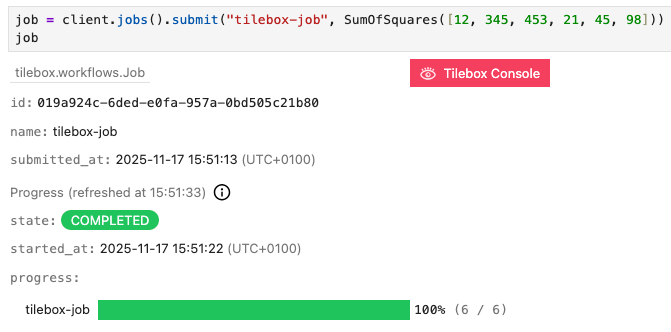
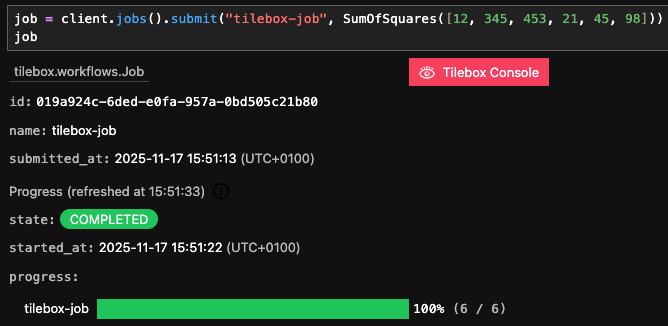
In interactive environments such as Jupyter notebooks, the job object also provides a rich display of the job's state and progress, if it's used as the last expression in a cell.
 ## States
Every Job is always in exactly one of the following states:
## States
Every Job is always in exactly one of the following states:


Submitted
The Job hasn't started yet, all it's tasks are queued and it wasn't canceled by the user.


Running
At least one task of the job is currently running.


Started
The job has started, some tasks are already `COMPUTED`, but others are still `QUEUED`, waiting for an [eligible runner](/workflows/concepts/runners#task-selection) to pick them up. However no task is currently `RUNNING`.


Completed
The job has successfully completed. Every task of the job succeeded and is `COMPUTED`.


Failed
At least one task of the job has failed, causing the execution of the remaining tasks to be halted. You can [retry](#retries) the job to resume execution from the point of failure.


Canceled
The job was canceled upon user request. You can [retry](#retries) the job to resume execution from the point of cancellation.
The state of a job is determined by the states of all it's tasks. For a list of possible task states, see the [task state](/workflows/concepts/tasks#task-states) documentation.
You can programmatically check the state of a job by inspecting it's `state` field.
```python Python theme={"system"}
from tilebox.workflows.data import JobState
job = job_client.find("018dd029-58ca-74e5-8b58-b4f99d610f9a")
print("Job is running:", job.state == JobState.RUNNING)
```
```go Go theme={"system"}
job, err := client.Jobs.Get(ctx, uuid.MustParse("018dd029-58ca-74e5-8b58-b4f99d610f9a"))
fmt.Println("Job is running:", job.State == workflows.JobRunning)
```
```plaintext Output theme={"system"}
Job is running: True
```
## Visualization
Visualizing the execution of a job can be helpful. The Tilebox workflow orchestrator tracks all tasks in a job, including [sub-tasks](/workflows/concepts/tasks#task-composition-and-subtasks) and [dependencies](/workflows/concepts/tasks#dependencies). This enables the visualization of the execution of a job as a graph diagram.
`display` is designed for use in an [interactive environment](/sdks/python/sample-notebooks#interactive-environments) such as a Jupyter notebook. In non-interactive environments, use [visualize](/api-reference/python/tilebox.workflows/JobClient.visualize), which returns the rendered diagram as an SVG string.
Visualization isn't supported in Go yet.
```python Python theme={"system"}
job = job_client.find("some-job-id") # or a recently submitted job
# Then visualize it
job_client.display(job)
```
The following diagram represents the job execution as a graph. Each task is shown as a node, with edges indicating sub-task relationships. The diagram also uses color coding to display the state of each task.

 Below is another visualization of a job currently being executed by multiple runners.

 From the diagram, the following can be inferred:
* The root task, `MyTask`, has been executed, is marked as `COMPUTED` and submitted three sub-tasks.
* At least three runners are available, as three tasks currently are executed simultaneously.
* The `SubTask` that is still executing has not generated any sub-tasks yet, as sub-tasks are queued for execution only after the parent task finishes and becomes computed.
* The queued `DependentTask` requires the `LeafTask` to complete before it can be executed.
Job visualizations are meant for development and debugging. They are not suitable for large jobs with hundreds of tasks, as the diagrams may become too complex. Currently, visualizations are limited to jobs with a maximum of 200 tasks.
### Customizing Task Display Names
The text representing a task in the diagram defaults to a tasks class name. You can customize this by modifying the `display` field of the `current_task` object in the task's execution context. The maximum length for a display name is 1024 characters, with any overflow truncated. Line breaks using `\n` are supported as well.
```python Python theme={"system"}
from tilebox.workflows import Task, ExecutionContext
class RootTask(Task):
num_subtasks: int
def execute(self, context: ExecutionContext):
context.current_task.display = f"Root({self.num_subtasks})"
for i in range(self.num_subtasks):
context.submit_subtask(SubTask(i))
class SubTask(Task):
index: int
def execute(self, context: ExecutionContext):
context.current_task.display = f"Leaf Nr. {self.index}"
job = job_client.submit('custom-display-names', RootTask(3))
job_client.display(job)
```
```go Go theme={"system"}
type RootTask struct {
NumSubtasks int
}
func (t *RootTask) Execute(ctx context.Context) error {
err := workflows.SetTaskDisplay(ctx, fmt.Sprintf("Root(%d)", t.NumSubtasks))
if err != nil {
return fmt.Errorf("failed to set task display: %w", err)
}
for i := range t.NumSubtasks {
_, err := workflows.SubmitSubtask(ctx, &SubTask{Index: i})
if err != nil {
return fmt.Errorf("failed to submit subtask: %w", err)
}
}
return nil
}
type SubTask struct {
Index int
}
func (t *SubTask) Execute(ctx context.Context) error {
err := workflows.SetTaskDisplay(ctx, fmt.Sprintf("Leaf Nr. %d", t.Index))
if err != nil {
return fmt.Errorf("failed to set task display: %w", err)
}
return nil
}
// in main
job, err := client.Jobs.Submit(ctx, "custom-display-names",
[]workflows.Task{&RootTask{
NumSubtasks: 3,
}},
)
```
From the diagram, the following can be inferred:
* The root task, `MyTask`, has been executed, is marked as `COMPUTED` and submitted three sub-tasks.
* At least three runners are available, as three tasks currently are executed simultaneously.
* The `SubTask` that is still executing has not generated any sub-tasks yet, as sub-tasks are queued for execution only after the parent task finishes and becomes computed.
* The queued `DependentTask` requires the `LeafTask` to complete before it can be executed.
Job visualizations are meant for development and debugging. They are not suitable for large jobs with hundreds of tasks, as the diagrams may become too complex. Currently, visualizations are limited to jobs with a maximum of 200 tasks.
### Customizing Task Display Names
The text representing a task in the diagram defaults to a tasks class name. You can customize this by modifying the `display` field of the `current_task` object in the task's execution context. The maximum length for a display name is 1024 characters, with any overflow truncated. Line breaks using `\n` are supported as well.
```python Python theme={"system"}
from tilebox.workflows import Task, ExecutionContext
class RootTask(Task):
num_subtasks: int
def execute(self, context: ExecutionContext):
context.current_task.display = f"Root({self.num_subtasks})"
for i in range(self.num_subtasks):
context.submit_subtask(SubTask(i))
class SubTask(Task):
index: int
def execute(self, context: ExecutionContext):
context.current_task.display = f"Leaf Nr. {self.index}"
job = job_client.submit('custom-display-names', RootTask(3))
job_client.display(job)
```
```go Go theme={"system"}
type RootTask struct {
NumSubtasks int
}
func (t *RootTask) Execute(ctx context.Context) error {
err := workflows.SetTaskDisplay(ctx, fmt.Sprintf("Root(%d)", t.NumSubtasks))
if err != nil {
return fmt.Errorf("failed to set task display: %w", err)
}
for i := range t.NumSubtasks {
_, err := workflows.SubmitSubtask(ctx, &SubTask{Index: i})
if err != nil {
return fmt.Errorf("failed to submit subtask: %w", err)
}
}
return nil
}
type SubTask struct {
Index int
}
func (t *SubTask) Execute(ctx context.Context) error {
err := workflows.SetTaskDisplay(ctx, fmt.Sprintf("Leaf Nr. %d", t.Index))
if err != nil {
return fmt.Errorf("failed to set task display: %w", err)
}
return nil
}
// in main
job, err := client.Jobs.Submit(ctx, "custom-display-names",
[]workflows.Task{&RootTask{
NumSubtasks: 3,
}},
)
```

 ## Cancellation
You can cancel a job at any time. When a job is canceled, no queued tasks will be picked up by runners and executed even if runners are idle. Tasks that are already being executed will finish their execution and not be interrupted. All sub-tasks spawned from such tasks after the cancellation will not be picked up by runners.
Use the `cancel` method on the job client to cancel a job.
```python Python theme={"system"}
job = job_client.submit('my-job', MyTask())
# After a short while, the job gets canceled
job_client.cancel(job)
```
```go Go theme={"system"}
job, err := client.Jobs.Submit(ctx, "my-job",
[]workflows.Task{&MyTask{}},
)
if err != nil {
slog.Error("Failed to submit job", slog.Any("error", err))
return
}
// After a short while, the job gets canceled
err = client.Jobs.Cancel(ctx, job.ID)
```
A canceled job can be resumed at any time by [retrying](#retries) it.
If any task in a job fails, the job is automatically canceled to avoid executing irrelevant tasks. Future releases will allow configuring this behavior for each task to meet specific requirements.
## Retries
If a task fails due to a bug or lack of resources, there is no need to resubmit the entire job. You can simply retry the job, and it will resume from the point of failure. This ensures that all the work that was already done up until the point of the failure isn't lost.
Future releases may introduce automatic retries for certain failure conditions, which can be useful for handling temporary issues.
Below is an example of a failing job due to a bug in the task's implementation. The following workflow processes a list of movie titles and queries the [OMDb API](http://www.omdbapi.com/) for each movie's release date.
```python Python theme={"system"}
from urllib.parse import urlencode
import httpx
from tilebox.workflows import Task, ExecutionContext
class MoviesStats(Task):
titles: list[str]
def execute(self, context: ExecutionContext) -> None:
for title in self.titles:
context.submit_subtask(PrintMovieStats(title))
class PrintMovieStats(Task):
title: str
def execute(self, context: ExecutionContext) -> None:
params = {"t": self.title, "apikey": ""}
url = "http://www.omdbapi.com/?" + urlencode(params)
with context.tracer.span("fetch-movie-stats") as span:
span.set_attribute("movie.title", self.title)
response = httpx.get(url).json()
# set the display name of the task to the title of the movie:
context.current_task.display = response["Title"]
context.logger.info(
"Movie release date fetched",
title=response["Title"],
released=response["Released"],
)
```
```go Go theme={"system"}
package movie
import (
"context"
"encoding/json"
"fmt"
"io"
"net/http"
"net/url"
"github.com/tilebox/tilebox-go/workflows/v1"
)
type MoviesStats struct {
Titles []string
}
func (t *MoviesStats) Execute(ctx context.Context) error {
for _, title := range t.Titles {
_, err := workflows.SubmitSubtask(ctx, &PrintMovieStats{Title: title})
if err != nil {
return fmt.Errorf("failed to submit subtask: %w", err)
}
}
return nil
}
type Movie struct {
Title *string `json:"Title"`
Released *string `json:"Released"`
}
type PrintMovieStats struct {
Title string
}
func (t *PrintMovieStats) Execute(ctx context.Context) error {
apiURL := fmt.Sprintf("http://www.omdbapi.com/?t=%s&apikey=%s", url.QueryEscape(t.Title), "")
response, err := http.Get(apiURL)
if err != nil {
return fmt.Errorf("failed to fetch movie: %w", err)
}
defer response.Body.Close()
body, err := io.ReadAll(response.Body)
if err != nil {
return fmt.Errorf("failed to read response: %w", err)
}
var movie Movie
err = json.Unmarshal(body, &movie)
if err != nil {
return fmt.Errorf("failed to unmarshal response: %w", err)
}
// set the display name of the task to the title of the movie:
err := workflows.SetTaskDisplay(ctx, *movie.Title)
if err != nil {
return fmt.Errorf("failed to set task display: %w", err)
}
fmt.Printf("%s was released on %s\n", *movie.Title, *movie.Released)
return nil
}
```
Submitting the workflow as a job reveals a bug in the `PrintMovieStats` task.
```python Python theme={"system"}
job = job_client.submit('movies-stats', MoviesStats([
"The Matrix",
"Shrek 2",
"Tilebox - The Movie",
"The Avengers",
]))
job_client.display(job)
```
```go Go theme={"system"}
job, err := client.Jobs.Submit(ctx, "movies-stats",
[]workflows.Task{&MoviesStats{
Titles: []string{
"The Matrix",
"Shrek 2",
"Tilebox - The Movie",
"The Avengers",
},
}},
)
```
## Cancellation
You can cancel a job at any time. When a job is canceled, no queued tasks will be picked up by runners and executed even if runners are idle. Tasks that are already being executed will finish their execution and not be interrupted. All sub-tasks spawned from such tasks after the cancellation will not be picked up by runners.
Use the `cancel` method on the job client to cancel a job.
```python Python theme={"system"}
job = job_client.submit('my-job', MyTask())
# After a short while, the job gets canceled
job_client.cancel(job)
```
```go Go theme={"system"}
job, err := client.Jobs.Submit(ctx, "my-job",
[]workflows.Task{&MyTask{}},
)
if err != nil {
slog.Error("Failed to submit job", slog.Any("error", err))
return
}
// After a short while, the job gets canceled
err = client.Jobs.Cancel(ctx, job.ID)
```
A canceled job can be resumed at any time by [retrying](#retries) it.
If any task in a job fails, the job is automatically canceled to avoid executing irrelevant tasks. Future releases will allow configuring this behavior for each task to meet specific requirements.
## Retries
If a task fails due to a bug or lack of resources, there is no need to resubmit the entire job. You can simply retry the job, and it will resume from the point of failure. This ensures that all the work that was already done up until the point of the failure isn't lost.
Future releases may introduce automatic retries for certain failure conditions, which can be useful for handling temporary issues.
Below is an example of a failing job due to a bug in the task's implementation. The following workflow processes a list of movie titles and queries the [OMDb API](http://www.omdbapi.com/) for each movie's release date.
```python Python theme={"system"}
from urllib.parse import urlencode
import httpx
from tilebox.workflows import Task, ExecutionContext
class MoviesStats(Task):
titles: list[str]
def execute(self, context: ExecutionContext) -> None:
for title in self.titles:
context.submit_subtask(PrintMovieStats(title))
class PrintMovieStats(Task):
title: str
def execute(self, context: ExecutionContext) -> None:
params = {"t": self.title, "apikey": ""}
url = "http://www.omdbapi.com/?" + urlencode(params)
with context.tracer.span("fetch-movie-stats") as span:
span.set_attribute("movie.title", self.title)
response = httpx.get(url).json()
# set the display name of the task to the title of the movie:
context.current_task.display = response["Title"]
context.logger.info(
"Movie release date fetched",
title=response["Title"],
released=response["Released"],
)
```
```go Go theme={"system"}
package movie
import (
"context"
"encoding/json"
"fmt"
"io"
"net/http"
"net/url"
"github.com/tilebox/tilebox-go/workflows/v1"
)
type MoviesStats struct {
Titles []string
}
func (t *MoviesStats) Execute(ctx context.Context) error {
for _, title := range t.Titles {
_, err := workflows.SubmitSubtask(ctx, &PrintMovieStats{Title: title})
if err != nil {
return fmt.Errorf("failed to submit subtask: %w", err)
}
}
return nil
}
type Movie struct {
Title *string `json:"Title"`
Released *string `json:"Released"`
}
type PrintMovieStats struct {
Title string
}
func (t *PrintMovieStats) Execute(ctx context.Context) error {
apiURL := fmt.Sprintf("http://www.omdbapi.com/?t=%s&apikey=%s", url.QueryEscape(t.Title), "")
response, err := http.Get(apiURL)
if err != nil {
return fmt.Errorf("failed to fetch movie: %w", err)
}
defer response.Body.Close()
body, err := io.ReadAll(response.Body)
if err != nil {
return fmt.Errorf("failed to read response: %w", err)
}
var movie Movie
err = json.Unmarshal(body, &movie)
if err != nil {
return fmt.Errorf("failed to unmarshal response: %w", err)
}
// set the display name of the task to the title of the movie:
err := workflows.SetTaskDisplay(ctx, *movie.Title)
if err != nil {
return fmt.Errorf("failed to set task display: %w", err)
}
fmt.Printf("%s was released on %s\n", *movie.Title, *movie.Released)
return nil
}
```
Submitting the workflow as a job reveals a bug in the `PrintMovieStats` task.
```python Python theme={"system"}
job = job_client.submit('movies-stats', MoviesStats([
"The Matrix",
"Shrek 2",
"Tilebox - The Movie",
"The Avengers",
]))
job_client.display(job)
```
```go Go theme={"system"}
job, err := client.Jobs.Submit(ctx, "movies-stats",
[]workflows.Task{&MoviesStats{
Titles: []string{
"The Matrix",
"Shrek 2",
"Tilebox - The Movie",
"The Avengers",
},
}},
)
```

 One of the `PrintMovieStats` tasks fails with a `KeyError`. This error occurs when a movie title is not found by the [OMDb API](http://www.omdbapi.com/), leading to a response without the `Title` and `Released` fields.
Task logs from the runners confirm this:
```plaintext Logs theme={"system"}
Movie release date fetched title="The Matrix" released="31 Mar 1999"
Movie release date fetched title="Shrek 2" released="19 May 2004"
ERROR: Task PrintMovieStats failed with exception: KeyError('Title')
```
The corrected version of `PrintMovieStats` is as follows:
```python Python theme={"system"}
class PrintMovieStats(Task):
title: str
def execute(self, context: ExecutionContext) -> None:
params = {"t": self.title, "apikey": ""}
url = "http://www.omdbapi.com/?" + urlencode(params)
with context.tracer.span("fetch-movie-stats") as span:
span.set_attribute("movie.title", self.title)
response = httpx.get(url).json()
if "Title" in response and "Released" in response:
context.current_task.display = response["Title"]
context.logger.info(
"Movie release date fetched",
title=response["Title"],
released=response["Released"],
)
else:
context.current_task.display = f"NotFound: {self.title}"
context.logger.info("Movie release date not found", title=self.title)
```
```go Go theme={"system"}
type PrintMovieStats struct {
Title string
}
func (t *PrintMovieStats) Execute(ctx context.Context) error {
url2 := fmt.Sprintf("http://www.omdbapi.com/?t=%s&apikey=%s", url.QueryEscape(t.Title), "")
response, err := http.Get(url2)
if err != nil {
return fmt.Errorf("failed to fetch movie: %w", err)
}
defer response.Body.Close()
body, err := io.ReadAll(response.Body)
if err != nil {
return fmt.Errorf("failed to read response: %w", err)
}
var movie Movie
err = json.Unmarshal(body, &movie)
if err != nil {
return fmt.Errorf("failed to unmarshal response: %w", err)
}
if movie.Released != nil && movie.Title != nil {
err := workflows.SetTaskDisplay(ctx, *movie.Title)
if err != nil {
return fmt.Errorf("failed to set task display: %w", err)
}
fmt.Printf("%s was released on %s\n", *movie.Title, *movie.Released)
} else {
err := workflows.SetTaskDisplay(ctx, fmt.Sprintf("NotFound: %s", t.Title))
if err != nil {
return fmt.Errorf("failed to set task display: %w", err)
}
fmt.Printf("Could not find the release date for %s\n", t.Title)
}
return nil
}
```
With this fix, and after redeploying the runners with the updated `PrintMovieStats` implementation, you can retry the job:
```python Python theme={"system"}
job_client.retry(job)
job_client.display(job)
```
```go Go theme={"system"}
_, err := client.Jobs.Retry(ctx, job.ID)
```
One of the `PrintMovieStats` tasks fails with a `KeyError`. This error occurs when a movie title is not found by the [OMDb API](http://www.omdbapi.com/), leading to a response without the `Title` and `Released` fields.
Task logs from the runners confirm this:
```plaintext Logs theme={"system"}
Movie release date fetched title="The Matrix" released="31 Mar 1999"
Movie release date fetched title="Shrek 2" released="19 May 2004"
ERROR: Task PrintMovieStats failed with exception: KeyError('Title')
```
The corrected version of `PrintMovieStats` is as follows:
```python Python theme={"system"}
class PrintMovieStats(Task):
title: str
def execute(self, context: ExecutionContext) -> None:
params = {"t": self.title, "apikey": ""}
url = "http://www.omdbapi.com/?" + urlencode(params)
with context.tracer.span("fetch-movie-stats") as span:
span.set_attribute("movie.title", self.title)
response = httpx.get(url).json()
if "Title" in response and "Released" in response:
context.current_task.display = response["Title"]
context.logger.info(
"Movie release date fetched",
title=response["Title"],
released=response["Released"],
)
else:
context.current_task.display = f"NotFound: {self.title}"
context.logger.info("Movie release date not found", title=self.title)
```
```go Go theme={"system"}
type PrintMovieStats struct {
Title string
}
func (t *PrintMovieStats) Execute(ctx context.Context) error {
url2 := fmt.Sprintf("http://www.omdbapi.com/?t=%s&apikey=%s", url.QueryEscape(t.Title), "")
response, err := http.Get(url2)
if err != nil {
return fmt.Errorf("failed to fetch movie: %w", err)
}
defer response.Body.Close()
body, err := io.ReadAll(response.Body)
if err != nil {
return fmt.Errorf("failed to read response: %w", err)
}
var movie Movie
err = json.Unmarshal(body, &movie)
if err != nil {
return fmt.Errorf("failed to unmarshal response: %w", err)
}
if movie.Released != nil && movie.Title != nil {
err := workflows.SetTaskDisplay(ctx, *movie.Title)
if err != nil {
return fmt.Errorf("failed to set task display: %w", err)
}
fmt.Printf("%s was released on %s\n", *movie.Title, *movie.Released)
} else {
err := workflows.SetTaskDisplay(ctx, fmt.Sprintf("NotFound: %s", t.Title))
if err != nil {
return fmt.Errorf("failed to set task display: %w", err)
}
fmt.Printf("Could not find the release date for %s\n", t.Title)
}
return nil
}
```
With this fix, and after redeploying the runners with the updated `PrintMovieStats` implementation, you can retry the job:
```python Python theme={"system"}
job_client.retry(job)
job_client.display(job)
```
```go Go theme={"system"}
_, err := client.Jobs.Retry(ctx, job.ID)
```

 Now the task logs show:
```plaintext Logs theme={"system"}
Movie release date not found title="Tilebox - The Movie"
Movie release date fetched title="The Avengers" released="04 May 2012"
```
The logs confirm that only two tasks were executed, resuming from the point of failure instead of re-executing all tasks.
The job was retried and succeeded. The two tasks that completed before the failure were not re-executed.
Now the task logs show:
```plaintext Logs theme={"system"}
Movie release date not found title="Tilebox - The Movie"
Movie release date fetched title="The Avengers" released="04 May 2012"
```
The logs confirm that only two tasks were executed, resuming from the point of failure instead of re-executing all tasks.
The job was retried and succeeded. The two tasks that completed before the failure were not re-executed.