> ## Documentation Index
> Fetch the complete documentation index at: https://docs.tilebox.com/llms.txt
> Use this file to discover all available pages before exploring further.
# Tilebox Workflows
> Run space data workflows across local, on-premises, and cloud environments with agent-friendly iteration loops.
Want to learn by example? Run your first workflow by creating a task, starting a runner, submitting a job, and inspecting the result.
Tilebox Workflows is a parallel processing engine for space data operations. It helps you turn processing steps such as fetching scenes, validating products, generating previews, running models, and publishing outputs into [tasks](/workflows/concepts/tasks) that can run across local machines, on-premises systems, and cloud environments.
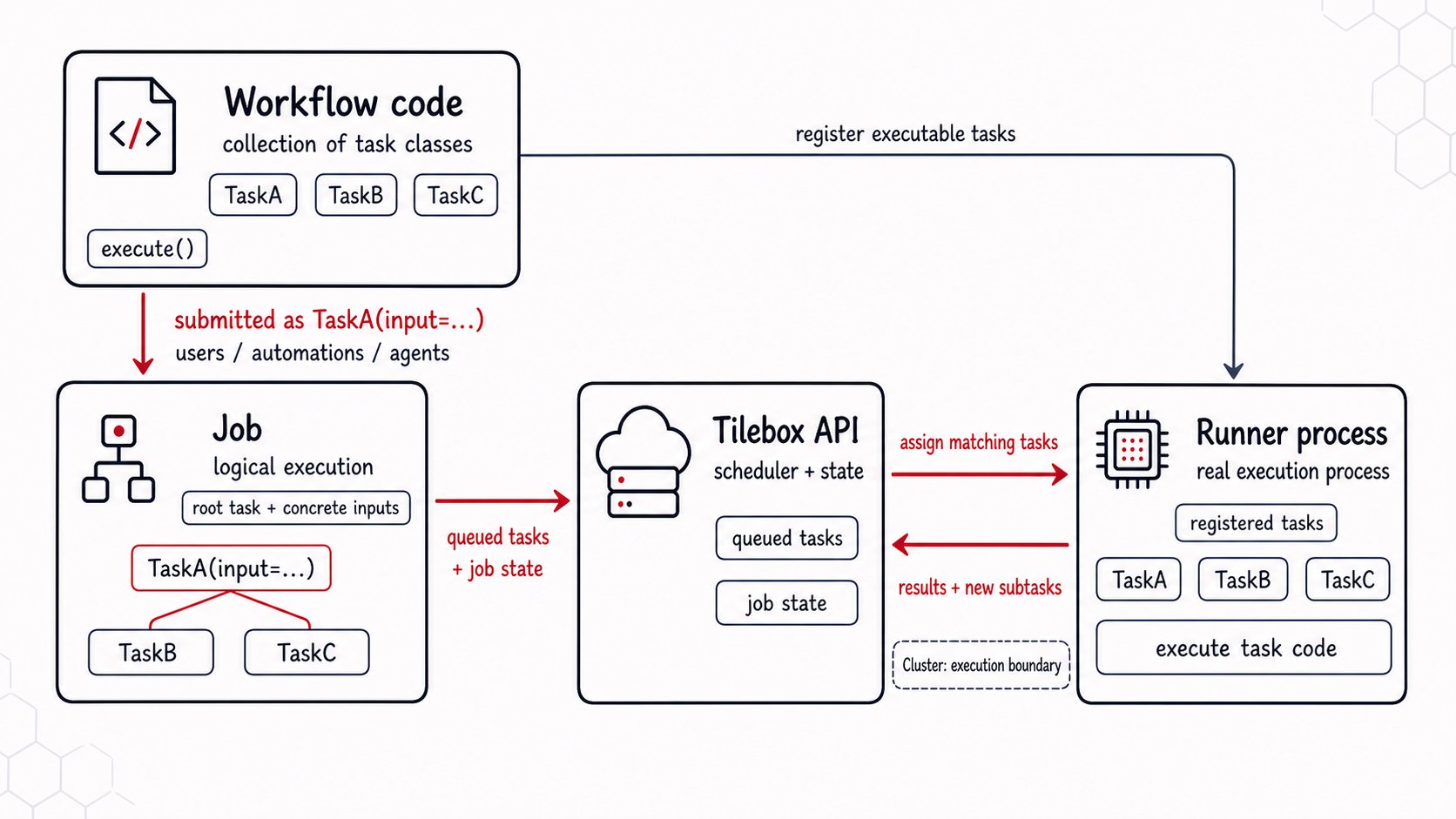
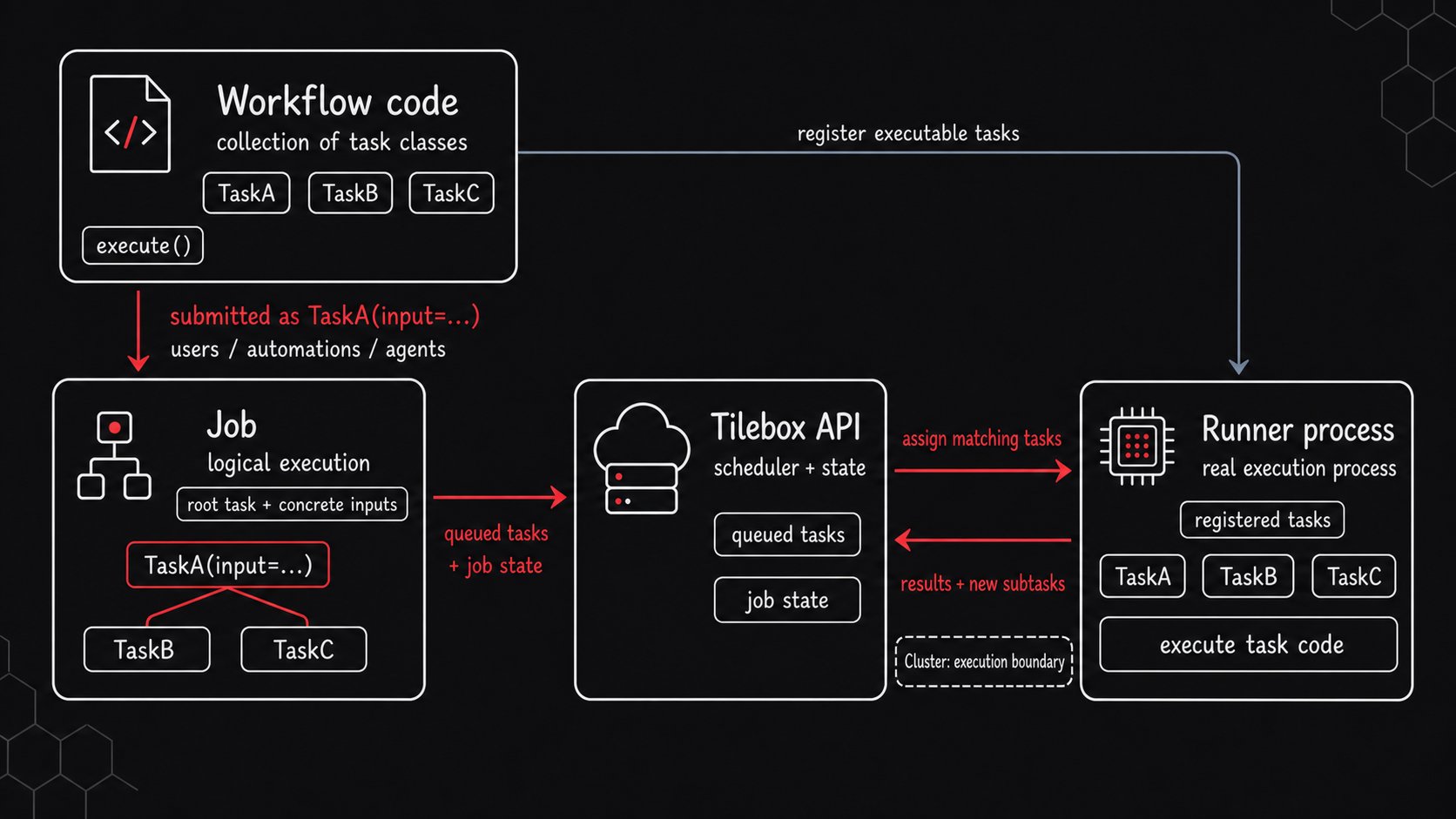 You submit a [job](/workflows/concepts/jobs) from workflow code, and Tilebox tracks the resulting task graph while [runners](/workflows/concepts/runners) execute eligible work on the selected [cluster](/workflows/concepts/clusters). During development, you can run tasks directly from your own script or service. For reproducible deployment, you can publish [workflow releases](/workflows/concepts/workflow-releases), deploy them to clusters, and let release runners execute the deployed code.
This model also gives AI coding agents a practical iteration loop: edit workflow code, publish a release, deploy it to a development cluster, submit a test job, and inspect logs, traces, and job state before making the next change.
## Get Started with Tilebox Workflows
Define task classes, inputs, subtasks, dependencies, retries, and identifiers.
Submit a root task to a cluster and let runners execute the resulting task graph.
Learn how to set up a runner in order to execute tasks.
Package workflow projects into immutable releases.
Map releases to clusters and run them with `tilebox runner start`.
Use logs, traces, and job state to debug workflows across runners.
## Terminology
Before exploring Tilebox Workflows in depth, familiarize yourself with some common terms used throughout this section.
A Task is the smallest unit of work, designed to perform a specific operation. Each task represents a distinct operation or process that can be executed, such as processing data, performing calculations, or managing resources. Tasks can operate independently or as components of a more complex set of connected tasks known as a Workflow. Tasks are defined by their code, inputs, and dependencies on other tasks. To create tasks, you need to define the input parameters and specify the action to be performed during execution.
A job is a specific execution of a workflow with designated input parameters. It consists of one or more tasks that can run in parallel or sequentially, based on their dependencies. Submitting a job involves creating a root task with specific input parameters, which may trigger the execution of other tasks within the same job.
Runners are processes that execute workflow tasks for a cluster. Direct runners register task classes from a standalone script, service, or binary that connects to the Tilebox API through the SDK. Release runners are started by the Tilebox CLI and load task registrations from Python workflow releases deployed to their cluster.
A workflow release is an immutable package of a workflow project. It includes source files, the command or runner object used to start the workflow runtime, and the task identifiers discovered during release validation.
Clusters group runners and receive workflow release deployments. Jobs are submitted to a cluster, and only runners assigned to that cluster can claim the job's tasks. A release runner can run multiple releases that are deployed to its cluster.
Caches are shared storage that enable data storage and retrieval across tasks within a single job. They store intermediate results and share data among tasks, enabling distributed computing and reducing redundant data processing.
Observability refers to the feature set in Tilebox Workflows that provides visibility into the execution of tasks and jobs. Tools like tracing and logging allow users to monitor performance, diagnose issues, and gain insights into job operations, enabling efficient troubleshooting and optimization.
You submit a [job](/workflows/concepts/jobs) from workflow code, and Tilebox tracks the resulting task graph while [runners](/workflows/concepts/runners) execute eligible work on the selected [cluster](/workflows/concepts/clusters). During development, you can run tasks directly from your own script or service. For reproducible deployment, you can publish [workflow releases](/workflows/concepts/workflow-releases), deploy them to clusters, and let release runners execute the deployed code.
This model also gives AI coding agents a practical iteration loop: edit workflow code, publish a release, deploy it to a development cluster, submit a test job, and inspect logs, traces, and job state before making the next change.
## Get Started with Tilebox Workflows
Define task classes, inputs, subtasks, dependencies, retries, and identifiers.
Submit a root task to a cluster and let runners execute the resulting task graph.
Learn how to set up a runner in order to execute tasks.
Package workflow projects into immutable releases.
Map releases to clusters and run them with `tilebox runner start`.
Use logs, traces, and job state to debug workflows across runners.
## Terminology
Before exploring Tilebox Workflows in depth, familiarize yourself with some common terms used throughout this section.
A Task is the smallest unit of work, designed to perform a specific operation. Each task represents a distinct operation or process that can be executed, such as processing data, performing calculations, or managing resources. Tasks can operate independently or as components of a more complex set of connected tasks known as a Workflow. Tasks are defined by their code, inputs, and dependencies on other tasks. To create tasks, you need to define the input parameters and specify the action to be performed during execution.
A job is a specific execution of a workflow with designated input parameters. It consists of one or more tasks that can run in parallel or sequentially, based on their dependencies. Submitting a job involves creating a root task with specific input parameters, which may trigger the execution of other tasks within the same job.
Runners are processes that execute workflow tasks for a cluster. Direct runners register task classes from a standalone script, service, or binary that connects to the Tilebox API through the SDK. Release runners are started by the Tilebox CLI and load task registrations from Python workflow releases deployed to their cluster.
A workflow release is an immutable package of a workflow project. It includes source files, the command or runner object used to start the workflow runtime, and the task identifiers discovered during release validation.
Clusters group runners and receive workflow release deployments. Jobs are submitted to a cluster, and only runners assigned to that cluster can claim the job's tasks. A release runner can run multiple releases that are deployed to its cluster.
Caches are shared storage that enable data storage and retrieval across tasks within a single job. They store intermediate results and share data among tasks, enabling distributed computing and reducing redundant data processing.
Observability refers to the feature set in Tilebox Workflows that provides visibility into the execution of tasks and jobs. Tools like tracing and logging allow users to monitor performance, diagnose issues, and gain insights into job operations, enabling efficient troubleshooting and optimization.